Words to Pages Converter: How Many Pages Is 1000 Words?
Type a word count and pick a format to see how many pages it fills, or switch to pages to words.
Recent
Your last 10 settings, saved only in this browser. Nothing is uploaded.
How to use the words to pages converter
- Open the tool and make sure “Words to pages” is selected.
- Type your total in “Word count”. To save time, pick a preset instead: “1,000 words”, “5,000 words”, “50,000-word book” or “100k manuscript”.
- Choose a “Format” from the list, such as “Document, double-spaced (12 pt)”, “Manuscript (12 pt, double, 1 in margins)”, “Trade paperback 6 × 9 in” or “Mass-market paperback 4.25 × 6.87 in”.
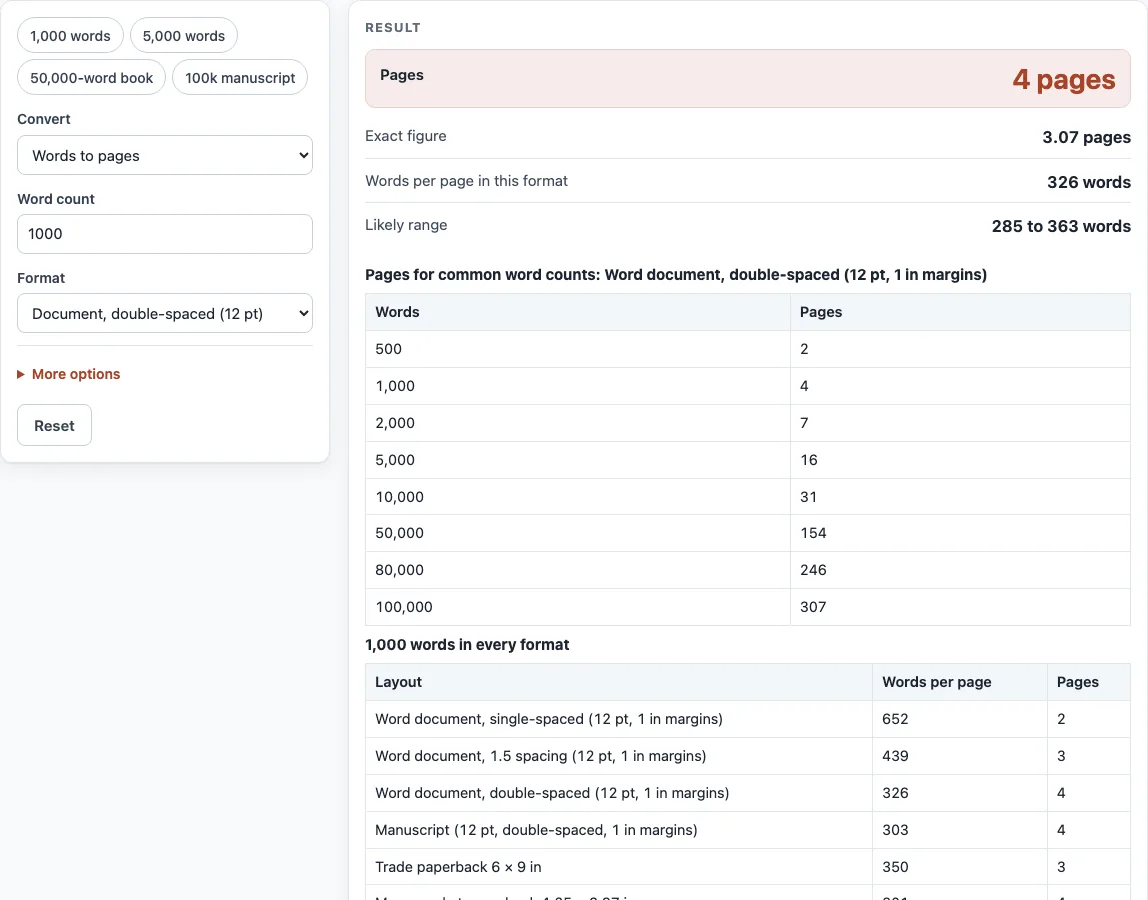
- Read “Pages” for the whole-page answer and “Exact figure” for the unrounded number. Check “Words per page in this format” and “Likely range” to see how much the estimate could move.
- If your book has a title page, copyright page or other extra pages, open More options and enter them in “Front and back matter (pages)”. You can also adjust “Average word length” and “Average paragraph length (words)”.
- Scroll down to “Pages for common word counts:
” for a quick table from 500 to 100,000 words, or to “ words in every format” to compare all layouts side by side. - Use “Copy result” or “Copy link” to keep the answer.
To go the other way, switch to “Pages to words” mode, enter a page count and read the “Words” output. A warning appears if front and back matter takes up all of your pages, and another appears if the word count is over 2,000,000.
How many pages is 1000 words?
A little over 3 pages double-spaced (it starts a fourth page), about 1.5 pages single-spaced and just under 3 in a printed trade paperback. The exact figure depends on how many words fit on one page in the layout you choose.
A page holds a set number of lines, each line holds a set number of words, and the lines are not always full. The tool multiplies these to get words per page, then divides your word count by that number. In the double-spaced document layout, a page holds about 326 words, so 1,000 words come to 3.07 pages. Pages are whole, so that rounds up to 4.
Font and spacing change the answer more than anything else. Browser measurements of two novels in the same double-spaced layout gave 278 and 364 words per page, which is why the tool shows a range of 285 to 363 for that layout. The older rule of thumb, 250 words per page, also gives 4 pages here, but it is shown only for comparison. Shunn, whose manuscript guidelines are widely used, calls that rule obsolete for proportional fonts.
How many words is a 300-page novel?
About 90,000 words in a mass-market paperback and about 105,000 words in a 6 × 9 in trade layout. The same page count holds more words in the trade layout because each page carries more text.
In the model, a mass-market page holds about 301 words and a trade page holds about 350. Multiply the page count by the words per page to estimate the total: 300 × 301 is about 90,300, and 300 × 350 is 105,000. Printed books also add front matter and chapter openings, so the printed page count is higher than the text needs. Enter those extra pages in “Front and back matter (pages)” and the tool will show how much room they take up.
Sources (checked 13 October 2026): William Shunn · William Shunn (2) · Reedsy · Butterick’s Practical Typography · Butterick’s Practical Typography (2)
Worked examples
| Input | Result |
|---|---|
| 1,000 words, Word document, double-spaced (12 pt, 1 in margins) | 4 pages (3.07 pages) |
| 50,000 words, Trade paperback 6 × 9 in | 143 pages (143 pages) |
| 2,000 words, Word document, single-spaced (12 pt, 1 in margins) | 4 pages (3.07 pages) |
| 100,000 words, Manuscript (12 pt, double-spaced, 1 in margins) | 330 pages (330 pages) |
| 300 pages, Mass-market paperback 4.25 × 6.87 in | about 90,299 words |
Calculated by the tool above; open it with the same values to see each step.
Frequently asked questions
How many pages is 50000 words?
About 154 pages double-spaced, 165 pages as a manuscript and 143 pages in a 6 × 9 in trade paperback. A mass-market paperback comes to about 167 pages because its smaller page holds less text.
How many pages is 2000 words, or 5000 words?
2,000 words is 7 pages double-spaced and 4 pages single-spaced. 5,000 words is 16 pages double-spaced, 8 pages single-spaced and 15 pages in a trade paperback.
How many pages for a novel?
There is no single number, because the answer depends on the word count and the layout. For example, 80,000 words is 229 pages in a trade paperback, 246 pages double-spaced and 264 pages as a manuscript. Shunn’s manuscript guidance suggests 120,000 words as a cap for an average first novel, so check the word count your genre and publisher expect.
How many pages is an average book?
The tool does not give an average, and page counts vary with trim size, font and word count. Enter your planned word count and choose the trade or mass-market format to see the pages for your book.
Why does my printer’s page count differ from this tool’s?
Printer templates differ and change over time, so confirm the final numbers with your printer’s current template. The tool assumes running text with no chapter breaks or headings. For those, use the chapter tool.
Related tools
- Words per page calculator: use this to see the words per page behind any layout.
- Novel word count checker: use this to check whether your manuscript length fits your genre.
- Chapter length calculator: use this to plan chapter lengths once you know your total.
- Manuscript format generator: use this to set up a manuscript layout before you submit.
- Book margins calculator: use this to check margins for a print layout.
- Standard book sizes chart: use this to compare common trim sizes before choosing one.
- Book spine width calculator: use this to work out spine width from your page count.
- Book cover size calculator: use this to size a cover for your trim size and page count.