Words Per Page Calculator: How Many Words Per Page in a Novel
Choose a page or trim size, margins, font and spacing to see how many words fit on a page, and how many pages your word count fills.
Recent
Your last 10 settings, saved only in this browser. Nothing is uploaded.
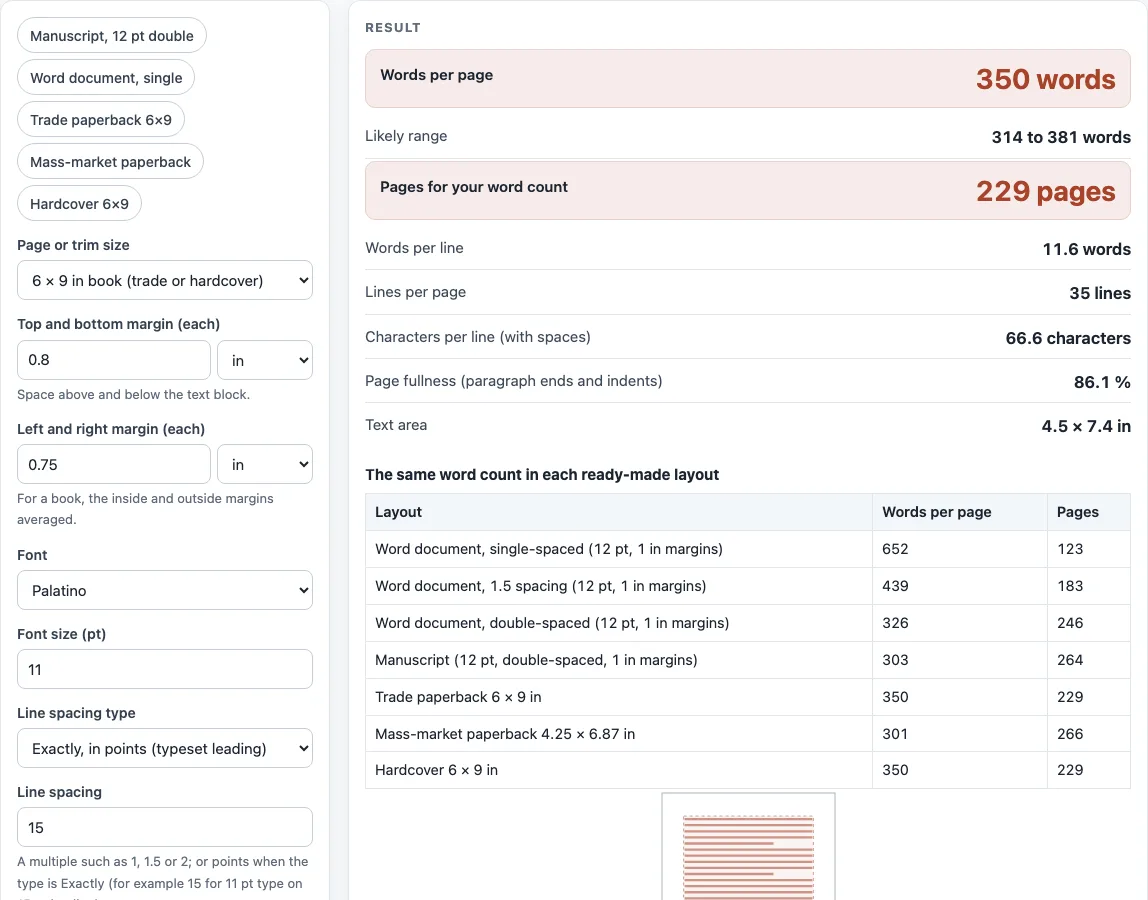
How to use the words per page calculator
- Pick a “Page or trim size”. For a printed novel, choose a book size such as “6 × 9 in book”, or choose “Custom size” and enter “Page width” and “Page height”.
- Set “Top and bottom margin (each)” and “Left and right margin (each)”. You can type them in in, mm, cm or pt.
- Choose a “Font” and set “Font size (pt)”. If your font is not in the list, pick “Other font (enter its width)” and type its “Average word width (em)”.
- Choose a “Line spacing type”: either “Multiple of single spacing (1, 1.5, 2 …)” or “Exactly, in points (typeset leading)”. Then type a value in “Line spacing”.
- Open More options if you need to. Set “First-line indent (in)”, “Text lines taken by a running header”, “Space after each paragraph (pt)”, “Average word length (characters)” and “Average paragraph length (words)”.
- Read “Words per page” and “Likely range”. The range shows how the result shifts between dialogue-heavy and dense text.
- To convert a length, type a number in “Word count (to convert to pages)” and read “Pages for your word count”.
You can also tap one of five presets, such as “Manuscript, 12 pt double” or “Trade paperback 6×9”, and compare the “The same word count in each ready-made layout” table. Check the “How it was calculated” box to see each step with your numbers. Use “Copy result”, “Copy link” or “Print / save as PDF” to keep the numbers.
How many words per page in a novel?
A novel page usually holds about 330 to 380 words in a typeset trade paperback and about 280 to 360 on a double-spaced Times New Roman page. There is no single figure, because the page size, margins, font, type size and line spacing all change how much fits.
The calculator works in three steps. First, it finds the lines per page: text height × 72 ÷ line pitch, minus any header lines. Text height is page height minus top and bottom margins, and line pitch is font size × the font’s line factor × your spacing. Second, it finds the words per full line from the text width and the average width of a word. Third, it applies a fullness factor, because every paragraph ends part-way down a line and wastes some space. Words per page = lines × words per full line × fullness.
Paragraph length changes the fullness. Dialogue-heavy text has short paragraphs and fills fewer pages. In measured tests, a 6 × 9 trade layout with Palatino 11 pt on 15 pt leading gave 332 words per page for Pride and Prejudice, which has short paragraphs, and 376 for The Great Gatsby, which has long ones. The tool’s default of 40 words per paragraph sits between them, which is why the “Likely range” is wide.
Is the 250-words-per-page rule right?
No, not for most modern novels. The 250 figure comes from typewriter manuscripts: 10 words per line × 25 double-spaced lines. In a fixed-width font like Courier, 10 characters fill an inch, so the estimate held. Proportional fonts such as Times New Roman fit more words per line, so the old rule undercounts them. William Shunn, who wrote the best-known guide to manuscript format, says the rule worked “because most everyone was using a typewriter where ten characters took up exactly an inch and about 25 double-spaced lines fit on a page”, and that with a proportional font the estimate “no longer holds”.
Courier still fits the rule roughly. Shunn gives 120,000 to 140,000 words for a 480-page Courier manuscript, which is 250 to 292 words per page. The tool gives 253 for his sample setup (Courier New, exactly 24 pt leading, one header line), with a range of 227 to 275. Publishers count the actual computer-generated word count, not the page estimate, so use the word count from your file when you need a figure for a submission.
Sources (checked 13 October 2026): William Shunn · William Shunn (2) · Butterick’s Practical Typography · Butterick’s Practical Typography (2) · Reedsy · Wikipedia · Peter Norvig · Brysbaert (2019)
Worked examples
| Input | Result |
|---|---|
| Trade paperback 6 × 9 in, 80,000 words | 350 words per page, 229 pages |
| Mass-market paperback 4.25 × 6.87 in, 80,000 words | 301 words per page, 266 pages |
| Word document, double-spaced (12 pt, 1 in margins), 90,000 words | 303 words per page, 297 pages |
| Word document, single-spaced (12 pt, 1 in margins), 1,000 words | 652 words per page, 2 pages |
Calculated by the tool above; open it with the same values to see each step.
Frequently asked questions
Is 1000 words in 1 page?
No. A normal novel page holds roughly 220 to 380 words, so 1,000 words usually fills three to four pages. Dense, narrow-margin layouts can fit a little more.
How long is a 200-page book in words?
It depends on the layout. In the “Trade paperback 6×9” preset, about 314 to 381 words per page gives roughly 63,000 to 76,000 words for 200 pages, with about 70,000 at the midpoint.
How many words are on a page in a book?
It depends on the trim size and type. A mass-market 4.25 × 6.87 in page with 10-pt type holds about 300 words, and a 6 × 9 in trade page holds about 350.
How many words per page in a paperback novel?
The same as any printed novel: it depends on the layout. Start with the “Trade paperback 6×9” or “Mass-market paperback” preset, then change the font size and margins to match your book.
Does the tool count front and back matter?
No. It works out text pages only. Title pages, contents, and other front and back matter are extra pages you need to add yourself.
Can I use the tool to measure my own book?
Yes. Enter your book’s trim size, margins, type size and leading, then read “Words per page”. It works for plain running text, without headings, hyphenation or images.
Related tools
- Words to pages converter: convert a word count into an estimated page count.
- Novel word count checker: check whether a manuscript’s length is in the usual range for its genre.
- Chapter length calculator: plan how many words each chapter should contain.
- Manuscript format generator: set up a manuscript page for submission.
- Book margins calculator: work out margins for a given trim size.
- Standard book sizes chart: compare common trim sizes before you choose a layout.