Standard Book Sizes Chart
Filter the common trim sizes by book type, switch units and tick sizes to compare them to scale.
Recent
Your last 10 settings, saved only in this browser. Nothing is uploaded.
How to use the standard book sizes tool
- Choose a category chip, such as “Hardcover” or “Trade paperback”. Leave “All sizes” selected to see every size in the table.
- Pick a unit from the “Unit” list: Inches, Millimeters or Centimeters. The “Width” and “Height” columns update to match.
- Read each row. “Ratio” is the long side divided by the short side, and “Source” names where that size was published.
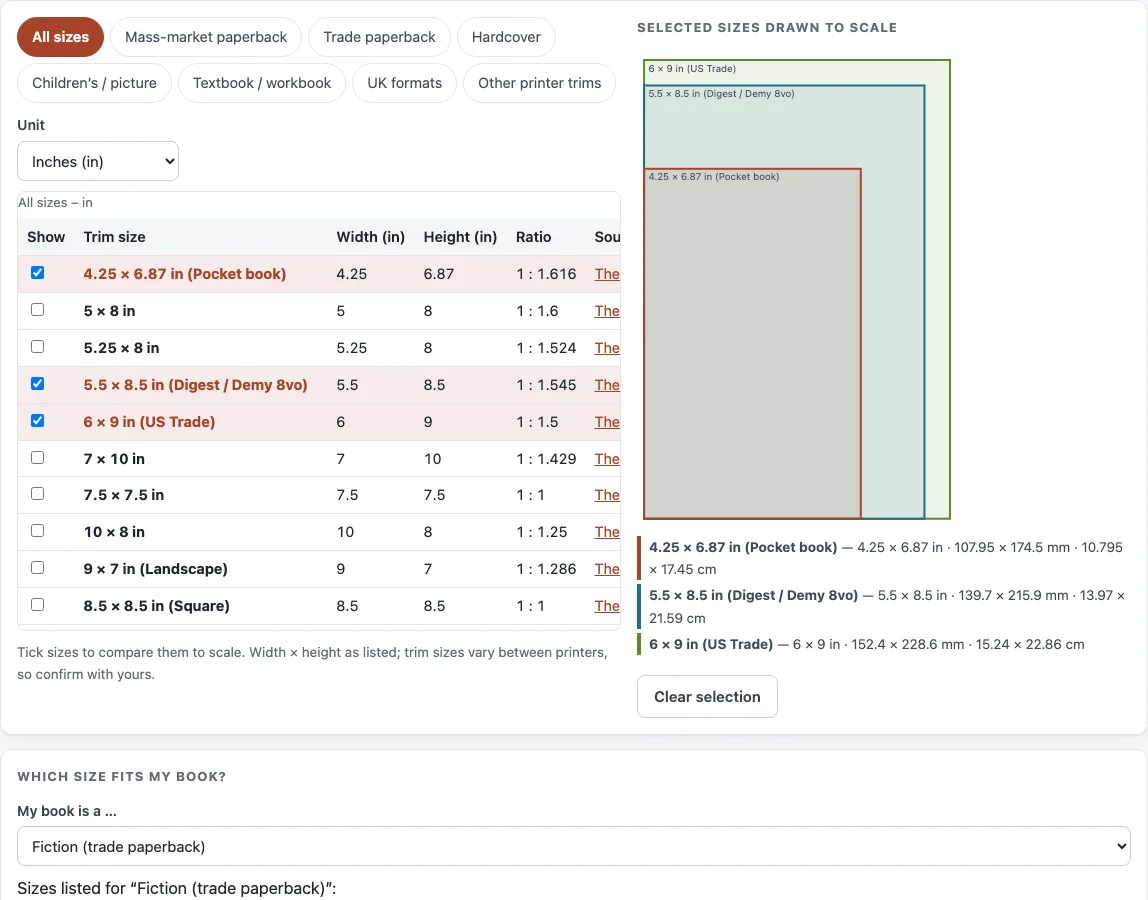
- Tick the “Show” box beside any sizes you want to compare. Ticked sizes are drawn to scale on top of each other under “Selected sizes drawn to scale”.
- If you are not sure which size applies, open “Which size fits my book?” and choose a type from “My book is a …”. The sizes appear under “Sizes listed for “…””. Select “Show these in the diagram” to draw them.
- Select “Clear selection” to untick every size, or “Reset” to return to the starting view.
Use “Print this table” to print the list, and “Copy link” to share the current view, including the unit and the sizes you ticked. The drawing puts every ticked size on the same corner, so you can see at a glance how much taller or wider one trim is than another.
What are standard book sizes?
Standard book sizes are the trim sizes that publishers and printers list most often for each type of book. The trim size is the width and height of the finished page. The Book Designer lists 5, 5.25, 5.5 and 6 inch wide trade paperback sizes for fiction (5 × 8, 5.25 × 8, 5.5 × 8.5 and 6 × 9 in) and 5.5 × 8.5, 6 × 9 and 7 × 10 in for non-fiction, and labels 6 × 9 in “US Trade”.
Each size is a convention listed by a source, not a rule every printer must follow. Sizes change with book type. A mass-market paperback is 4.25 × 6.87 inches (107.95 × 174.5 mm), while the sizes listed for textbooks are 6 × 9, 7 × 10 and 8.5 × 11 inches, and children’s books include 7.5 × 7.5 and 10 × 8 inches. UK formats are given in millimeters, such as the A-format at 110 × 178 mm, the B-format at 129 × 198 mm and the trade paperback at 135 × 216 mm.
Which book size should I choose?
Start from the book type, then the trim sizes listed for it. The helper “Which size fits my book?” gives these lists: fiction in trade paperback 5 × 8, 5.25 × 8, 5.5 × 8.5 or 6 × 9 in; non-fiction 5.5 × 8.5, 6 × 9 or 7 × 10 in; a novella 5 × 8 in; a memoir 5.25 × 8 or 5.5 × 8.5 in. In the UK the B-format (129 × 198 mm) has been used to set literary novels apart from genre fiction, which sells in the smaller A-format. A larger trim gives fewer, wider pages and a thinner spine; a smaller trim gives more pages and a thicker book.
What is the standard book size in cm?
A standard book size in centimeters is the same trim size converted from inches or millimeters. The conversion is simple: millimeters = inches × 25.4, and centimeters = millimeters ÷ 10. For example, 6 × 9 inches is 152.4 × 228.6 mm, which is 15.24 × 22.86 cm.
Another example is 5.5 × 8.5 inches, which is 139.7 × 215.9 mm, or 13.97 × 21.59 cm. To see every size in centimeters, set “Unit” to Centimeters. The tool stores each size as listed and converts it once, so the numbers stay consistent when you change units.
Sources (checked 13 October 2026): The Book Designer · Wikipedia · theguardian.com · IngramSpark file creation guide
Worked examples
| Input | Result |
|---|---|
| Mass-market paperback, in in; book type “Mass-market paperback” | 1 sizes listed; sizes for the book type: 4.25 × 6.87 in |
| Trade paperback, in cm; book type “Non-fiction (trade paperback)” | 5 sizes listed; sizes for the book type: 13.97 × 21.59 cm; 15.24 × 22.86 cm; 17.78 × 25.4 cm |
| UK formats, in mm; book type “UK literary novel (B-format)” | 6 sizes listed; sizes for the book type: 129 × 198 mm |
| Children’s / picture, in in; book type “Children’s book” | 3 sizes listed; sizes for the book type: 7.5 × 7.5 in; 7 × 10 in; 10 × 8 in |
Calculated by the tool above; open it with the same values to see each step.
Frequently asked questions
What is the standard paperback size?
Mass-market paperbacks are listed at 4.25 × 6.87 inches (107.95 × 174.5 mm). Trade paperback fiction is commonly 5.5 × 8.5 or 6 × 9 inches, according to The Book Designer.
What is the standard hardcover size?
The Book Designer lists 5.5 × 8.5, 6 × 9, 9 × 7, 8.5 × 8.5, 8 × 10, 8.5 × 11 and 11 × 8.5 inches for hardcovers. Choose the “Hardcover” chip to see them in the table.
Is 5.5 x 8.5 a standard book size?
Yes. The Book Designer lists it as a digest, trade paperback and hardcover size. IngramSpark lists it as Demy 8vo, at 216 × 140 mm.
What are the average book dimensions?
There is no published average book size: none of the sources behind this chart states one, so it lists the standard book dimensions printers and designers publish instead. A regular book size for a novel is one of the trade sizes above, and a mass-market paperback is smaller. Pick the size that matches your book type.
What is the standard size of a novel?
A novel is usually printed in one of the trade paperback sizes (5 × 8, 5.25 × 8, 5.5 × 8.5 or 6 × 9 in) or as a 4.25 × 6.87 in mass-market paperback. Choose “Fiction (trade paperback)” in the helper to draw the trade sizes.
Do printers use exactly these sizes?
Printers may round a size or differ by a fraction, and their specifications change over time. Confirm the final numbers with your printer’s current template before you finalize a file.
Related tools
- Book cover size calculator - Work out the full cover dimensions for your book.
- Book spine width calculator - Find the spine width once you know your page count and paper.
- Book cover template generator - Create a cover template for your trim size.
- Dust jacket size calculator - Size a dust jacket for a hardcover.
- Ebook cover size checker - Check whether an ebook cover meets common dimensions.
- Book margins calculator - Set inside and outside margins for your page size.
- DPI calculator - Check the resolution of images for print.
- PDF preflight check - Review a PDF for common print problems before you upload it.