Print Resolution Calculator
Enter your image's pixel size and the viewing distance to get the resolution you need and the largest sharp print.
Recent
Your last 10 settings, saved only in this browser. Nothing is uploaded.
A print resolution calculator tells you whether a digital image has enough pixels for the print size and viewing distance you have in mind. Enter the image width and height in pixels, plus the distance you will view the print from, and the tool shows the minimum ppi a 20/20 eye can resolve, the largest print your pixels support, and whether each standard size looks sharp.
The tool runs in your browser. Nothing is uploaded, there is no sign-up, and it is free. It assumes 20/20 vision and a flat print viewed head-on, so treat the results as a guide. Confirm final numbers with your printer’s current template before you order.
How to use the print resolution calculator
- Enter your photo’s size in the “Image width (px)” and “Image height (px)” boxes. A phone photo of 4000 x 3000 pixels means 4000 in the width box and 3000 in the height box.
- Enter the “Viewing distance” and choose its unit: in, ft, cm or m.
- To fill in common cases quickly, click a preset: “Photo in the hand (12 in)”, “Framed print (3 ft)”, “Poster (6 ft)” or “Phone photo (4000x3000)”.
- Read “Minimum ppi at this viewing distance (visual acuity)”. This is the lowest ppi a 20/20 eye can resolve at that distance.
- Read “Largest print at the minimum ppi” and “Largest print at the reference ppi”.
- If you want a different close-up target, open “More options” and change “Reference ppi for close-up prints” (300 by default).
- Check “Closest viewing distance at the reference ppi” and “Megapixels”.
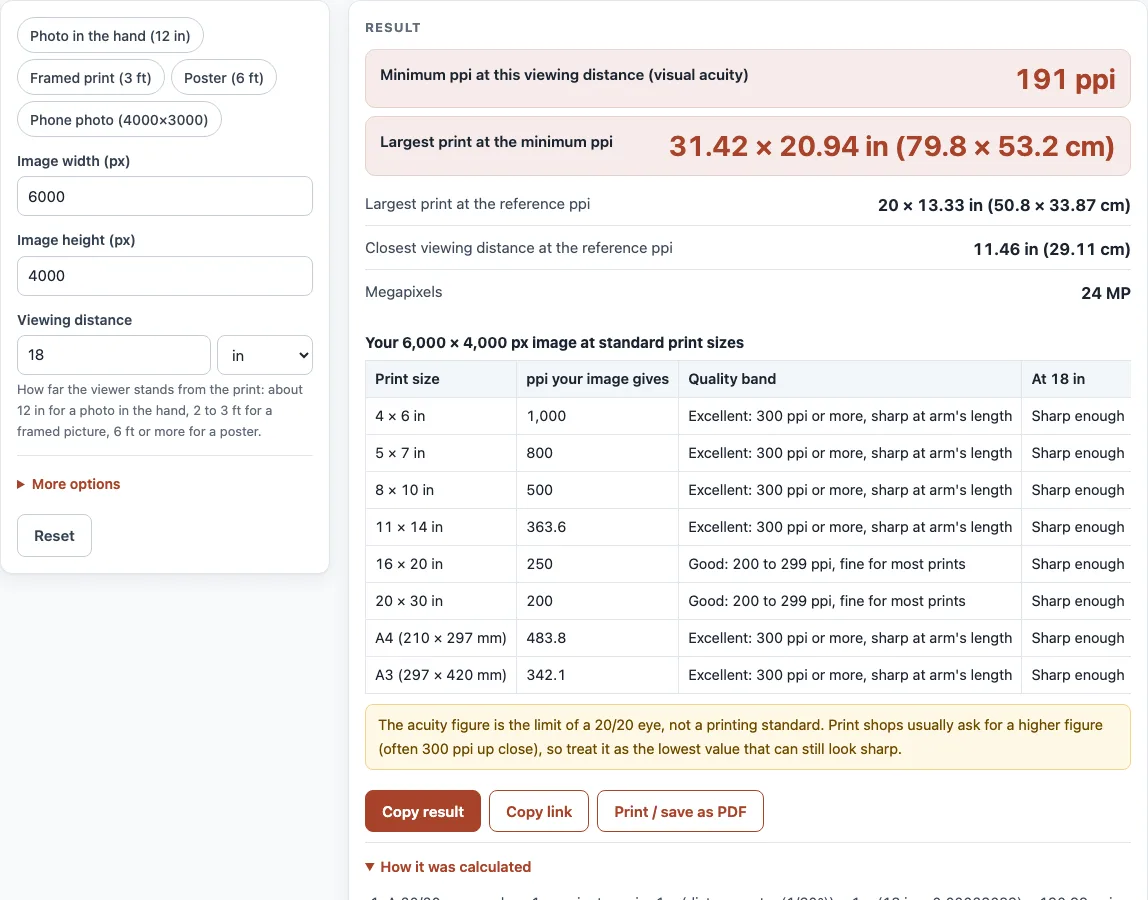
- Scroll to the table “Your W x H px image at standard print sizes”. For each size, compare “ppi your image gives” with the “Quality band” and the verdict, “Sharp enough” or “Pixels may show”, for the distance you chose.
Read the always-shown warning under the results. The acuity figure is the limit of a 20/20 eye, not a printing standard. The tool also flags acuity values above 600 ppi (very close viewing) and below 30 ppi.
What is the best resolution for printing photos?
For a photo viewed up close, 300 ppi is the usual target. The eye’s limit depends on distance, though. The farther away the viewer stands, the fewer pixels per inch they can separate, so the minimum falls as viewing distance grows. Large prints are commonly made at 150 ppi or less.
The formula comes from visual acuity. A 20/20 eye resolves two points separated by one arcminute, which is 1/60 of a degree. A pixel of pitch p seen from distance d subtends one arcminute when p = d tan(1/60°). That gives an acuity ppi of 3437.75 / d, with d in inches. At 12 in the limit is 286.5 ppi, at 18 in it is 191.0, at 3 ft it is 95.5 and at 6 ft it is 47.7.
Print shops usually build in a safety margin. One shop recommends 300 DPI at 0.6 m (about 24 in), where the formula gives about 145 ppi. A trade printer calls 150 DPI a good compromise for large format.
What is the most effective ppi for printing?
Pixels beyond the acuity limit are not resolved by a 20/20 eye at that distance, so adding them does not make the print look sharper to that viewer. The extra ppi above the acuity figure is the margin that helps up close.
The verdict in the table follows one rule: the print is “Sharp enough” when its ppi is at least the acuity ppi for the chosen distance. Below that, the verdict is “Pixels may show”. The “Quality band” labels are guidance based on the same bands as the DPI calculator, not an official standard.
How big can I print my photo?
The largest print is your pixel count divided by ppi, calculated on each side. For a 6000 x 4000 pixel image viewed from 18 in, the minimum ppi is 191, so the largest print is 31.42 x 20.94 in (79.8 x 53.2 cm). At 300 ppi the largest print is 20 x 13.33 in (50.8 x 33.87 cm). That image has 24 megapixels.
For standard sizes, the tool uses the smaller of the two ratios: width divided by print width, and height divided by print height. The image is scaled to cover the sheet, and the sheet is turned to match the image’s orientation. If the shapes differ, the edges are cropped. A4 is 210 x 297 mm and A3 is 297 x 420 mm.
Is higher always better?
No. Once the ppi passes the acuity figure for your distance (286 ppi at 12 inches, 95 ppi at 3 feet), extra pixels add nothing a 20/20 eye can see. A 6000 x 4000 pixel image viewed from 3 ft gives 95.49 ppi, with a largest print of 62.83 x 41.89 in. A phone photo of 4000 x 3000 pixels gives 300 ppi at 13.3 x 10 in. Extra pixels beyond what the distance needs make the file larger without improving the print.
Sources (checked 13 October 2026): Wikipedia · carleton.ca · help.tradeprint.co.uk · ISO
Worked examples
| Input | Result |
|---|---|
| 6000 × 4000 px image, viewed from 18 in | 191 ppi needed; largest print 31.42 × 20.94 in (79.8 × 53.2 cm) |
| 4000 × 3000 px image, viewed from 12 in | 286.5 ppi needed; largest print 13.96 × 10.47 in (35.47 × 26.6 cm) |
| 6000 × 4000 px image, viewed from 3 ft | 95.49 ppi needed; largest print 62.83 × 41.89 in (159.6 × 106.4 cm) |
| 3000 × 2000 px image, viewed from 2 m | 43.66 ppi needed; largest print 68.71 × 45.81 in (174.5 × 116.4 cm) |
Calculated by the tool above; open it with the same values to see each step.
Frequently asked questions
What does “Sharp enough” mean?
It means the ppi your image gives at that size is at least the acuity ppi for your viewing distance. This assumes 20/20 vision and a flat print viewed head-on.
What does “Pixels may show” mean?
It means the ppi is below the acuity limit, so a viewer with 20/20 vision at that distance may see individual pixels. Step back, choose a smaller size, or use a higher-resolution image.
Should I use the minimum ppi as my print target?
Not usually. Print shops commonly ask for more than the acuity minimum. Check your printer’s current template, because printer specifications differ and change.
What resolution do I need for a poster?
From 6 feet away the acuity limit is about 48 ppi, and a trade printer calls 150 ppi a good compromise for large formats, so 150 ppi is a safe target. A 24 × 36 in poster at 150 ppi needs 3,600 × 5,400 pixels.
Is my photo uploaded?
No. The calculator only needs the pixel size and the distance you type in; it reads no file, and everything runs in your browser.
Is the “Quality band” an official printing standard?
No. It is guidance only, based on the same bands as the DPI calculator.
Related tools
- DPI calculator: Work out the DPI or size for an image when you know the other values.
- Image DPI checker: Check the DPI recorded in an image file.
- PDF DPI checker: Check the image resolution inside a PDF before you send it to print.
- PDF preflight check: Review a PDF for print-readiness issues before you send it to print.
- RGB to CMYK converter: Convert colors from RGB to CMYK when a printer asks for CMYK files.
- CMYK to RGB converter: Convert colors from CMYK back to RGB for screen use.
- Book cover template generator: Build a cover layout sized for print.
- Paper size chart: Compare standard paper sizes in millimeters and inches.