Postcard Size and USPS Limits
Pick a card size and thickness to see whether it mails at the postcard price, and get the print file size with bleed and the safe area for text.
Recent
Your last 10 settings, saved only in this browser. Nothing is uploaded.
Postcard size matters twice: the card has to fit the postal limits for the postcard price, and the print file has to match the card with bleed. This free tool checks a card against the USPS rules for cards and letters and gives the file size for the printer. Also searched as postcard dimensions, it works for the common sizes, 4 x 6, 4.25 x 5.5, 5 x 7, 5.5 x 8.5, 6 x 9 and 6 x 11 inches, or any size you type. It runs in your browser, nothing is uploaded, and no sign-up is needed.
The limits come from the USPS Domestic Mail Manual and can change, so check the current manual and ask your printer for its template before you order. The tool does not show postage prices.
How to use the Postcard Size tool
- Pick a value from the “Card size (short x long)” list: 4 x 6, 4.25 x 5.5, 5 x 7, 5.5 x 8.5, 6 x 9, 6 x 11 and 8.5 x 11 inches. You can also select “Other” and type your own “Width (in)” and “Height (in)”. The shorter side is taken as the height.
- Type the “Thickness (in)” of your card stock, which starts at 0.014 in (14 pt). Take the figure from the caliper listed on your stock’s data sheet.
- Check “Postage class (USPS rules)” to see whether the card qualifies as a postcard, a letter, a nonmachinable letter, or whether it is too small, too thin, too thick or larger than a letter.
- Note the finished size in inches and millimetres under “Trim size”. “Length divided by height” shows the shape the letter rules test.
- Find the artwork dimensions in inches and pixels under “Print file size with bleed”. To adjust the “Bleed on each side (in)”, the “Safe margin inside the trim (in)” and the “File resolution (pixels per inch)”, open “More options”.
- Keep text and logos within the “Safe area for text” shown on the result.
- Look at any warning below the result, such as the nonmachinable surcharge warning for a square card.
- Each of the four preset buttons loads a sample: a 4 x 6 postcard, a 5 x 7 card, a 6 x 9 mailer or a 6 x 11 mailer.
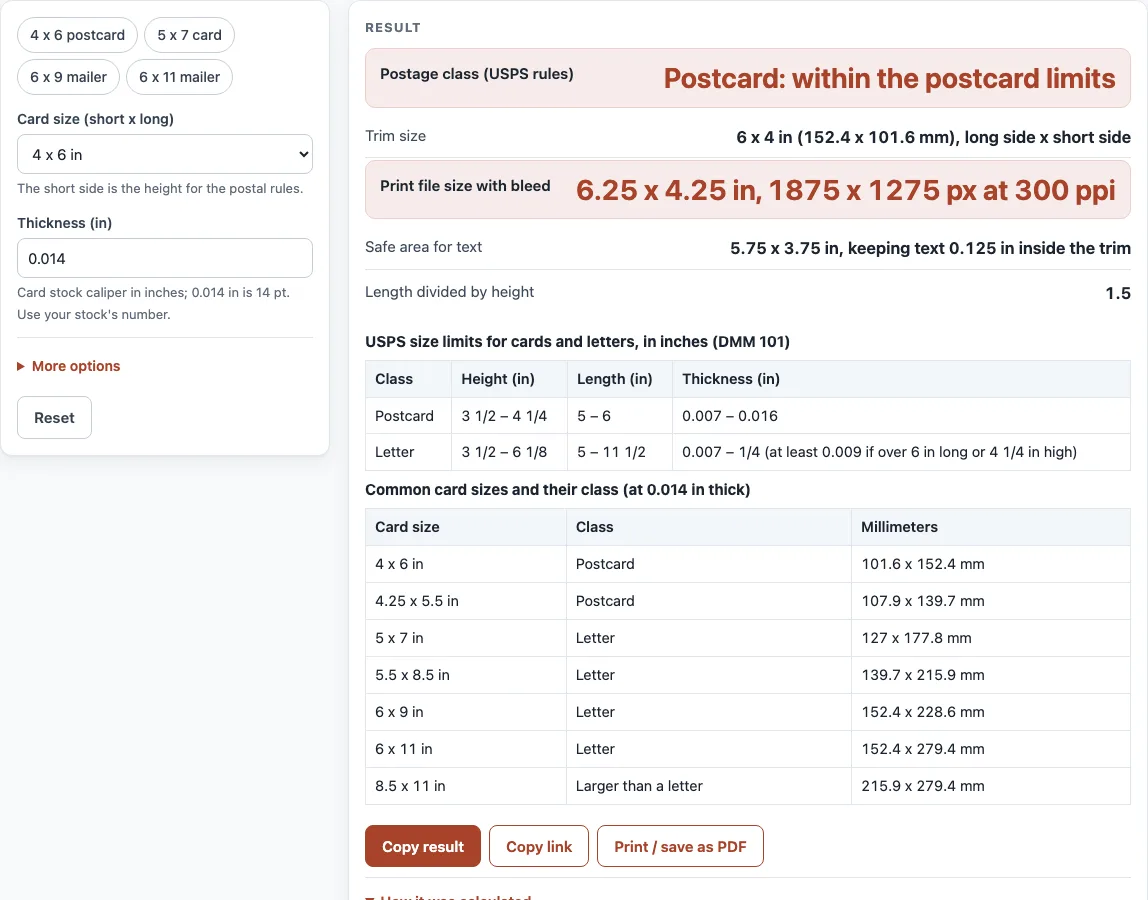
With no changes the page shows a 4 x 6 card, 0.014 in thick: a postcard, with a 6.25 x 4.25 in file (1875 x 1275 px at 300 ppi).
What size is a postcard for the postcard price?
The USPS Domestic Mail Manual sets the card limits at 3 1/2 to 4 1/4 inches high, 5 to 6 inches long, and 0.007 to 0.016 inch thick, in a rectangular shape. A 4 x 6 inch card fits, and so does 4.25 x 5.5 inches. A 5 x 7 inch card is 5 inches high, which is over 4 1/4, so it is mailed as a letter, and so are 5.5 x 8.5, 6 x 9 and 6 x 11 inch cards. The manual lets a letter be up to 6 1/8 inches high, 11 1/2 inches long and 1/4 inch thick; a piece longer than 6 inches or higher than 4 1/4 inches must be at least 0.009 inch thick.
Shape also counts for letters. If the length divided by the height is below 1.3 or above 2.5, the letter is nonmachinable, which can carry a surcharge, so check current prices. A square 5 x 5 inch card falls in that group. Anything bigger than a letter is mailed as a flat or parcel under other rules that the tool does not cover.
The postal rules call the shorter side the height and the longer side the length, whatever the design looks like, so a portrait card is checked the same way as a landscape one. The tool does the same: type the two sides in either order.
What postcard print file size do I need?
The print file is the trim size plus bleed on every side. For a 4 x 6 inch card with a 1/8 inch bleed, the file is 6.25 x 4.25 inches, which is 1875 x 1275 pixels at 300 ppi. Keep text inside the safe margin so a small cutting shift does not clip it. The 1/8 inch bleed and margin are starting values, not a standard, so use your printer’s own template when it gives different numbers.
Sources (checked 17 October 2026): USPS Domestic Mail Manual 101
Worked examples
| Input | Result |
|---|---|
| 4 x 6 in, 0.014 in thick | Postcard |
| 5 x 7 in, 0.014 in thick | Letter |
| 6 x 9 in, 0.012 in thick | Letter |
| 5 x 5 in, 0.02 in thick | Nonmachinable letter |
| 8.5 x 11 in, 0.014 in thick | Larger than a letter |
Calculated by the tool above; open it with the same values to see each step.
Frequently asked questions
What is the standard postcard size?
The most common postcard size is 4 x 6 inches. The USPS allows up to 4 1/4 x 6 inches at the postcard price, so 4 x 6 and 4.25 x 5.5 inches both fit.
What are the largest postcard dimensions for the postcard price?
At most 4 1/4 inches high, 6 inches long and 0.016 inch thick. The smallest allowed is 3 1/2 x 5 inches and 0.007 inch thick.
Can I mail a 5 x 7 postcard at the postcard price?
No. A 5 x 7 inch card is higher than 4 1/4 inches, so it is mailed as a letter. It is within the letter limits and is machinable.
How thick can a postcard be?
At most 0.016 inch for the postcard price. A thicker card of the same size is mailed as a letter, which allows up to 1/4 inch.
What size should the artwork be for a 4 x 6 postcard?
6.25 x 4.25 inches with a 1/8 inch bleed, or 1875 x 1275 pixels at 300 ppi. Check your printer’s template.
Do the USPS limits change?
They can. The tool follows the Domestic Mail Manual section 101 as read on 17 October 2026. Check the current manual or your post office before a large mailing.
Does the tool upload what I enter?
No. It runs in your browser and nothing is uploaded.
Related tools
- Paper Size Chart: Compare paper sizes side by side, drawn to scale.
- DPI Calculator: Work out the pixels per inch an image gives at a chosen print size.
- Print Resolution Calculator: Settle on a resolution for prints that will be viewed from a distance.
- Booklet Sizes: Plan a folded booklet made from flat sheets.
- Paper and Book Sizes: Browse every paper and book size tool in one spot.