Photo Print Sizes
Pick a print size to see the pixels it needs at your resolution, its aspect ratio, and how much of your photo is cut off to fill it without white borders.
Recent
Your last 10 settings, saved only in this browser. Nothing is uploaded.
Photo print sizes are fixed shapes, and your photo is rarely the same shape. This free tool lists the standard print sizes from 4 x 6 to 20 x 24 inches, shows the pixels each one needs at your resolution, and tells you how much of your photo is cropped to fill it. Also searched as 4x6 photo size and 5x7 photo size, it can check your own picture’s pixel size too. It runs in your browser, nothing is uploaded, and no sign-up is needed.
The sizes and names follow Wikipedia’s table of standard print sizes, which flags some of its entries for checking, so confirm the size with your lab. Wallet size is left out because the sources read disagree on it.
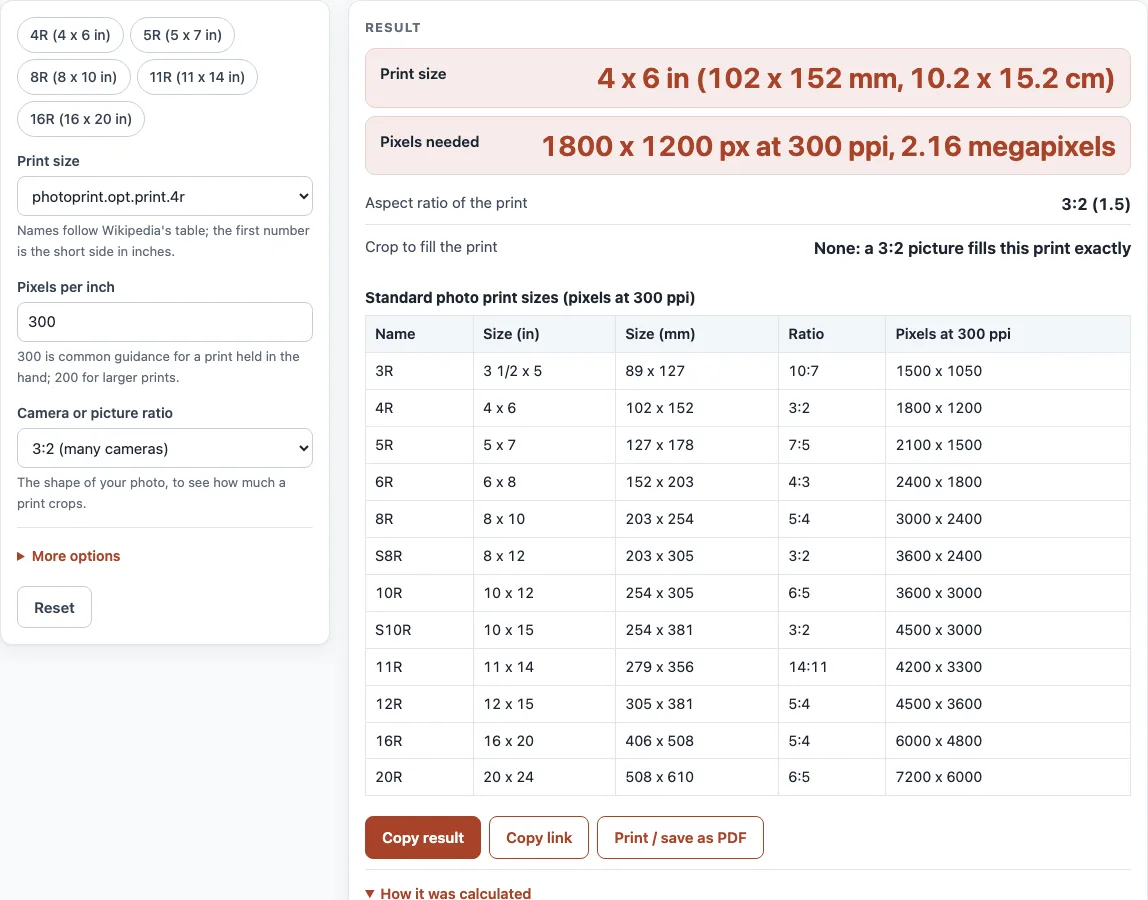
How to use the Photo Print Sizes tool
- Choose the “Print size”: 3R (3.5 x 5 in), 4R (4 x 6), 5R (5 x 7), 6R (6 x 8), 8R (8 x 10), S8R (8 x 12), 10R (10 x 12), S10R (10 x 15), 11R (11 x 14), 12R (12 x 15), 16R (16 x 20) or 20R (20 x 24).
- Set the “Pixels per inch”. It starts at 300, which is common guidance for a print held in the hand. Use 200 for larger prints.
- Choose the “Camera or picture ratio”: 3:2, 4:3, 5:4, 16:9 or 1:1. This is the shape of your photo.
- Read “Print size” for inches and millimetres, and “Pixels needed” for the width and height in pixels and the megapixels.
- Read “Aspect ratio of the print” and “Crop to fill the print”. The crop says how much of the long or short side is lost when the photo fills the print with no white borders.
- Open “More options” and type your picture’s width and height in pixels to see “Pixels per inch you have” when the picture fills the print.
- Read any warning, for example a crop over 10 % or a low pixel density. The table below the result lists every print size with its pixels at 300 ppi.
- The five preset buttons show 4R, 5R, 8R, 11R and 16R.
With no changes the page shows 4R: 4 x 6 in, 1800 x 1200 px at 300 ppi, with no crop from a 3:2 photo.
What are the standard photo print sizes?
Prints come in a few shapes. The 4 x 6 inch print (4R) has a 3:2 ratio, the same as many cameras, and so do 8 x 12 and 10 x 15. The 5 x 7 inch print is 7:5, 8 x 10 is 5:4, 11 x 14 is 14:11, 16 x 20 is 5:4 and 6 x 8 is 4:3. A 3R print is 3.5 x 5 inches, 10:7. In millimetres, 4 x 6 inches is 102 x 152 mm and 8 x 10 inches is 203 x 254 mm.
The larger sizes are named by a number and R: 8R is 8 x 10 inches and 16R is 16 x 20. An S prefix marks a 3:2 print, such as S8R at 8 x 12 inches.
How many pixels do I need for a print, and how much will it crop?
Multiply the print size in inches by the pixels per inch. At 300 ppi a 4 x 6 inch print needs 1800 x 1200 pixels, a 5 x 7 needs 2100 x 1500 and an 8 x 10 needs 3000 x 2400. A photo with a different shape is cropped to fill the print: a 3:2 photo printed at 8 x 10 loses about 16.7 percent of its long side, and a 16:9 photo on a 4 x 6 loses about 15.6 percent. If you would rather keep the whole photo, pick a print with the same ratio or accept white borders.
The pixels per inch you need depends on how the print is viewed. 300 ppi is common print-shop guidance for a print held in the hand and is a guide, not a standard. A print that hangs on a wall and is seen from farther away can use fewer pixels per inch, and the Print Resolution Calculator on this site works that out from the viewing distance. A phone photo of 4000 x 3000 pixels covers a 4 x 6 inch print many times over, but it falls under 300 ppi on an 11 x 14 inch print.
If you type your picture’s size, the tool divides the pixels by the print size. For a 4000 x 3000 pixel photo on an 11 x 14 inch print, that is about 273 pixels per inch.
Sources (checked 17 October 2026): Wikipedia, Standard photographic print sizes
Worked examples
| Input | Result |
|---|---|
| 4R print from a 3:2 picture | 1800 x 1200 px, ratio 3:2 |
| 8R print from a 3:2 picture | 3000 x 2400 px, ratio 5:4 |
| 5R print from a 16:9 picture | 2100 x 1500 px, ratio 7:5 |
| 11R print from a 3:2 picture | 4200 x 3300 px, ratio 14:11 |
| S10R print from a 3:2 picture | 3000 x 2000 px, ratio 3:2 |
Calculated by the tool above; open it with the same values to see each step.
Frequently asked questions
How many pixels is a 4x6 photo?
1800 x 1200 pixels at 300 ppi, which is 2.16 megapixels. At 200 ppi it is 1200 x 800 pixels.
How many pixels is a 5x7 photo?
2100 x 1500 pixels at 300 ppi, about 3.15 megapixels.
What is the aspect ratio of an 8x10 print?
5:4, or 1.25. A photo from a 3:2 camera is longer than that, so it loses about 16.7 percent of its long side when it fills an 8 x 10 print.
What print size matches a 3:2 camera photo?
4 x 6 inches (4R), 8 x 12 (S8R) and 10 x 15 (S10R) all have the 3:2 ratio, so a 3:2 photo prints with no crop.
How many pixels do I need for an 8x10?
3000 x 2400 pixels at 300 ppi, which is 7.2 megapixels.
What ppi should I use for a photo print?
300 ppi is the usual starting point for a print held in the hand, and 200 ppi is often enough for larger prints. The tool lets you change the number and shows the pixels each size needs.
Why is wallet size not in the list?
The sources read for this page disagree on wallet size, so it is left out rather than guessed.
Does the tool upload my picture?
No. You type the pixel size and nothing is uploaded; the page runs in your browser.
Related tools
- DPI Calculator: Use it to solve for pixels, print size or pixels per inch.
- Print Resolution Calculator: Use it to choose a resolution for the viewing distance.
- Image DPI Checker: Use it to read the pixel size and tagged DPI of an image file.
- Paper Size Chart: Use it to compare paper sizes drawn to scale.
- Paper and Book Sizes: Use it to see all the paper and book size tools in one place.