Paper Size Chart
Pick a series and a unit to see every paper size, drawn to scale, and compare any two sizes.
Recent
Your last 10 settings, saved only in this browser. Nothing is uploaded.
How to use the paper size chart
- Choose a series tab: “A series”, “B series”, “C series”, “US”, “ANSI” or “ARCH”.
- Open the “Unit” list (the table, the comparison and the printout all follow it) and pick Millimeters (mm), Centimeters (cm), Inches (in), Points (pt) or Pixels (px). For pixels, a “DPI” box appears; the default is 300.
- Read the table. It shows Size, Width, Height, Ratio and Area. Click a column header to sort the rows, for example by area to see which sizes are closest.
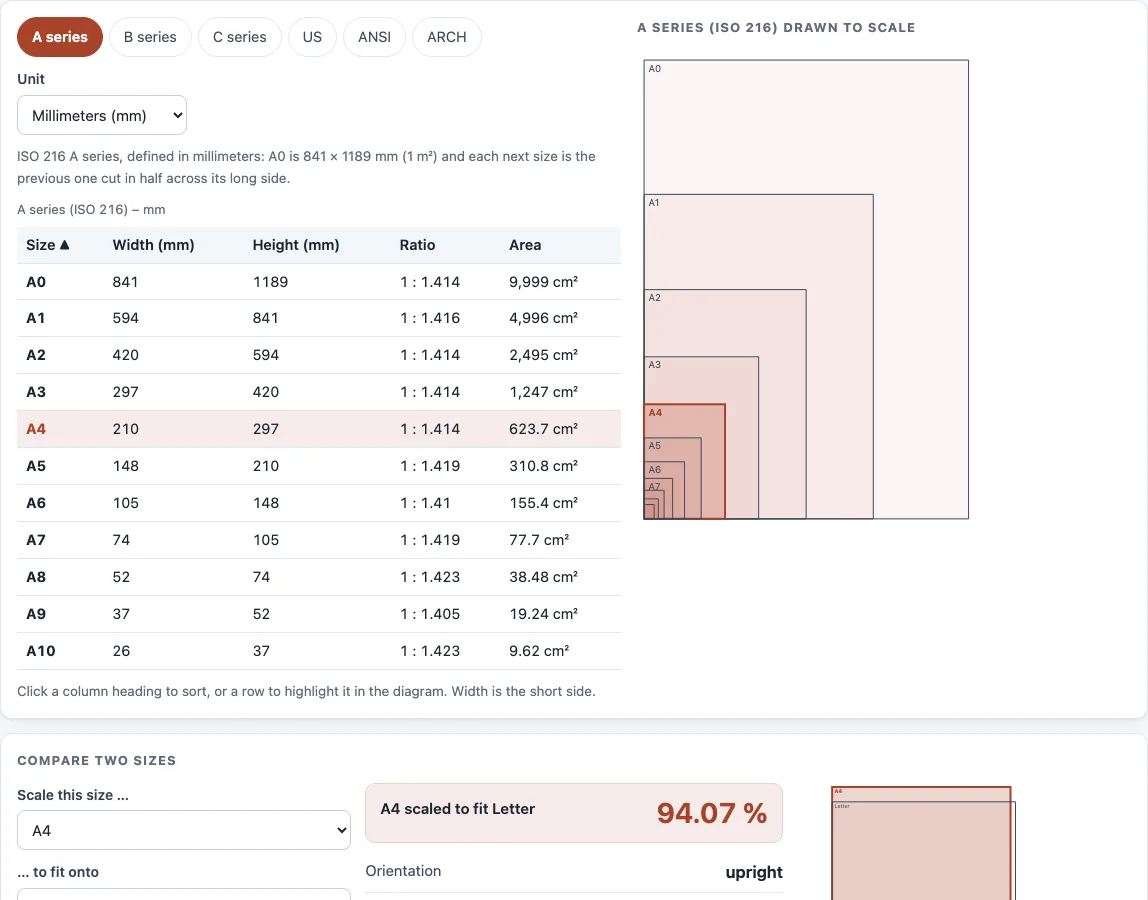
- Click a row or a sheet in the nested diagram to highlight that size; the diagram draws every size in the series from the same corner, to scale.
- Open “Compare two sizes”. Set “Scale this size …” and “… to fit onto”, then read “ scaled to fit ”, “Orientation”, “ scaled to fit ” and “Area of ÷ area of ”. Press “Swap sizes” to reverse the pair.
“Print this chart” prints the current table on one page, in the unit you chose, so you can pin a paper size guide next to the printer. “Copy link” saves your settings in the address bar, because the current state is stored in the ?s= part of the URL. “Reset” returns the tool to its starting settings.
Paper and page size guide: how are the sizes defined?
Each series comes from a standard. ISO 216 defines the A and B series and ISO 269 the C series of envelopes, all in millimeters. US sizes such as Letter, Legal and Tabloid, the ANSI A–E engineering sizes and the ARCH architectural sizes are defined in inches. The paper sizes measurements in the table are the exact values of each standard, converted only for display.
What is the paper size chart in inches?
The chart stores each series in the units it was defined in. ISO 216 sizes (A and B) are defined in millimeters, while US, ANSI and ARCH sizes are defined in inches. When you switch “Unit” to Inches, the millimeter sizes are converted at 25.4 mm per inch. A4 becomes 8.268 × 11.693 in, Letter is 8.5 × 11 in and Legal is 8.5 × 14 in.
Width is always the short side, so a sheet’s orientation does not change its listed width and height. The ISO A series starts at A0, which is 841 × 1189 mm, an area of about 1 m². Each following size halves the long side, rounded down to the whole millimeter, so A3 has exactly twice the area of A4.
What is the difference between A4 and Letter?
A4 is 210 × 297 mm, and US Letter is 215.9 × 279.4 mm (8.5 × 11 in). A4 is narrower and taller than Letter, and Letter is wider and shorter.
To fit one size onto another, the tool checks both orientations and takes the larger scale that still fits both sides. The rule is: scale = the greater, over both orientations, of the smaller of (target width ÷ source width) and (target height ÷ source height). For A4 onto Letter, the height is the limit: 279.4 ÷ 297 = 94.07 %. For Letter onto A4, the width is the limit: 210 ÷ 215.9 = 97.27 %. The area ratio is simply width × height of the first size divided by width × height of the second, so A4 ÷ Letter = 1.034.
Sources (checked 13 October 2026): ISO · Wikipedia · Wikipedia (2)
Worked examples
| Input | Result |
|---|---|
| A series (ISO 216), in mm; compare A4 and Letter | First rows: A0 841 × 1189; A1 594 × 841; A2 420 × 594. A4 fits onto Letter at 94.07 %; area ratio 1.034. |
| US sizes, in in; compare Legal and A4 | First rows: Letter 8.5 × 11; Legal 8.5 × 14; Tabloid 11 × 17. Legal fits onto A4 at 83.52 %; area ratio 1.231. |
| ARCH A–E1 (architectural), in in; compare ARCH B and ARCH D | First rows: ARCH A 9 × 12; ARCH B 12 × 18; ARCH C 18 × 24. ARCH B fits onto ARCH D at 200 %; area ratio 0.25. |
| A series (ISO 216), in px @ 300 DPI; compare A5 and A4 | First rows: A0 9933 × 14043; A1 7016 × 9933; A2 4961 × 7016. A5 fits onto A4 at 141.4 %; area ratio 0.4983. |
Calculated by the tool above; open it with the same values to see each step.
Frequently asked questions
Which size is 11 × 17?
A sheet measuring 11 × 17 in is Tabloid, which is also ANSI B. Ledger is the same sheet turned to landscape, so the chart stores it as 17 × 11.
How do I print one paper size on another?
Open “Compare two sizes” and set “Scale this size …” to your document and “… to fit onto” to the paper you have. Read the percentage in “ scaled to fit ”. For A4 onto Letter, the result is 94.07 %. Enter that scale in your print settings, then confirm the result with your printer’s current template.
What are the ARCH paper sizes?
The ARCH sizes run from ARCH A at 9 × 12 in to ARCH E at 36 × 48 in. The chart also includes ARCH E1 at 30 × 42 in. ARCH D is 24 × 36 in, which is 609.6 × 914.4 mm.
How many sizes does the chart cover?
The chart lists 54 sizes: 11 in the A series, 11 in the B series, 13 in the C series, 8 in US, 5 in ANSI and 6 in ARCH.
What units does the Area column use?
The Area column uses cm² when the unit is millimeters or centimeters, in² for inches or points, and MP (megapixels) for pixels.
Will my printer print at exactly these sizes?
Printer specifications differ and change over time, so the chart’s numbers are standard dimensions, not a guarantee of how your printer will handle them. Check the final numbers against your printer’s current template before you print.
Related tools
- A1 paper size: use it when you need the full dimensions of an A1 sheet.
- A2 paper size: use it when you need the full dimensions of an A2 sheet.
- A3 size in inches: use it when you need A3 measured in inches.
- Legal size paper dimensions: use it when you need the details of Legal paper.
- Booklet size and page calculator: use it when you are planning a booklet layout.
- Standard book sizes chart: use it when you are choosing a trim size for a book.
- DPI calculator: use it when you need to work out resolution from pixel dimensions.
- Print resolution calculator: use it when you need to check print quality for a given image size.