Standard Manuscript Format Generator
Type your name, title and word count to see a first page or novel title page laid out in standard manuscript format, ready to copy or print.
Recent
Your last 10 settings, saved only in this browser. Nothing is uploaded.
This free manuscript format tool lays out a first page for a short story, or a title page and first text page for a novel, in standard manuscript format. It runs in your browser with no sign-up, and nothing you enter is uploaded or stored.
You type your name, title and word count, and the tool shows a preview drawn to scale on US Letter paper, plus the word count line, running header and byline line you need. The layout follows Shunn’s manuscript format: 1-inch margins, 12-point Times New Roman or Courier New, double spacing, and a running header on every page after the first.
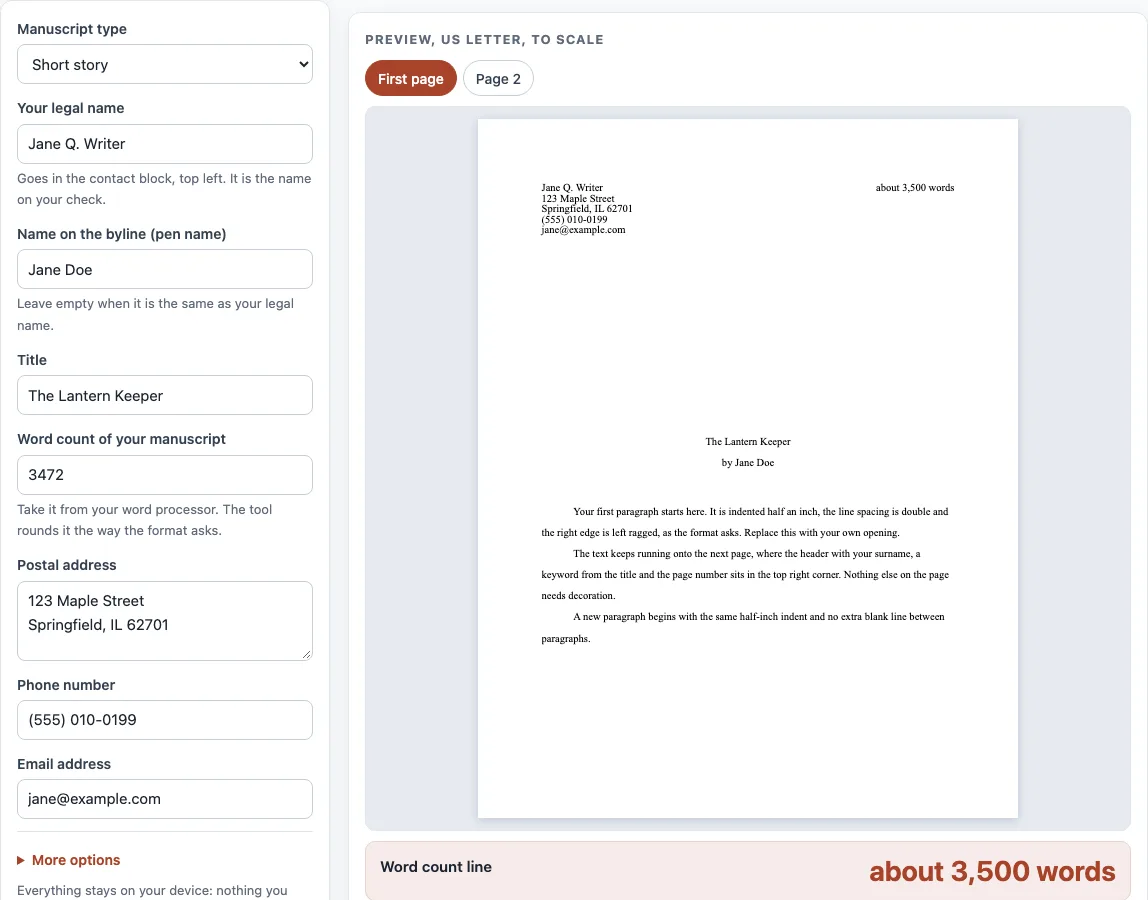
How to use the manuscript format tool
- Choose “Manuscript type”: “Short story” or “Novel”.
- Type your “Your legal name” and “Name on the byline (pen name)”. They can differ, but both must appear on the page.
- Enter your “Title” and the “Word count of your manuscript” from your word processor.
- Fill in “Postal address”, “Phone number” and “Email address” for the contact block.
- Open “More options” if you need “Agent or representation (optional)”, “Writing affiliations (optional)” or “Genre (optional, novel title page)”.
- Pick a “Preview font” and “Title position”, and adjust “Round the word count to”, “Surname in the running header” or “Keyword in the running header” if the automatic values are not what you want.
- Check the preview: “First page” and “Page 2” for a story, or “Title page”, “First text page” and “Page 2” for a novel.
- Copy the “Word count line”, “Running header (n = page number)” and “Byline line” into your file, or use “Copy header block” or “Download header block (.txt)”.
Use “Print (US Letter)” to print the title page and first text page for a novel, or the first page for a story. Some magazines, publishers and agents publish their own format; where they differ from this layout, follow theirs.
What the tool produces may be used for any purpose, including books for sale and client work, royalty-free and without attribution. The only limit is not to copy the website or the tool as a competing service.
What is standard manuscript format?
Standard manuscript format is the layout most editors and agents expect for fiction submissions. It uses 1-inch margins, 12-point Times New Roman or Courier New in black ink on white paper, and double spacing from the title down. The first page carries your contact details at upper left and the word count at upper right, and the title sits a third to halfway down the page.
The rest of the rules are small but consistent. Each paragraph’s first line is indented 0.5 inch, with one space between sentences. Use italics rather than underlining, write an em dash as two hyphens, and mark scene breaks with a centered #. Every page after the first carries a running header: your surname, one keyword from the title, and the page number. Some markets have their own rules, and Shunn advises following theirs where they differ.
What does a novel manuscript format sample look like?
A novel manuscript opens with a separate title page. It holds the contact block at upper left, the title about halfway down, “A Novel by” followed by your name, and the word count centered at the bottom. Two lines marked as additions to Shunn’s layout are the optional agent line (“Represented by”) and the optional genre line (“A
Page numbering starts at 1 on the first page of actual text, and each chapter begins on a new page. For a novel titled Silvertide by Perry Slaughter, the running header reads “Slaughter / Silvertide / 1” on the first text page, then the number increases on each page after that.
Sources (checked 13 October 2026): Shunn manuscript format · William Shunn · Shunn manuscript format (2) · William Shunn (2)
Worked examples
| Input | Result |
|---|---|
| Short story, 3,472 words, "The Lantern Keeper" | about 3,500 words; header "Doe / Lantern / n" |
| Short story, 1,486 words, "A Walk in the Rain" | about 1,500 words; header "Writer / Walk / n" |
| Novel, 79,380 words, "Silvertide" | about 79,500 words; header "Slaughter / Silvertide / n" |
| Short story, 21,400 words, "The Salt Road" | about 21,500 words; header "Doe / Salt / n" |
Calculated by the tool above; open it with the same values to see each step.
Frequently asked questions
How do I round the word count on a manuscript?
Round to the nearest hundred for most manuscripts, and to the nearest 500 for longer work. Shunn’s example is 1,486 words, which rounds to 1,500. The tool rounds to the nearest 100 below 15,000 words, and to the nearest 500 from 15,000 and for novels; you can force 100, 500 or 1,000 with “Round the word count to”.
How many pages should a novel manuscript be?
Publishers count words, not pages, because page counts change with font and spacing. A double-spaced Courier page holds roughly 216 to 292 words, so 80,000 words runs about 275 to 370 pages. In Times New Roman the tool counts about 303 words per page, so 80,000 words comes to about 264 pages. Shunn calls 120,000 words “about right as a cap for an average first novel.”
Is there a manuscript template?
The tool produces the first page or title page and a downloadable header block, but not a full manuscript file. Shunn also publishes word-processor templates you can use for the rest of your document.
Is there a standard for APA or MLA manuscripts here?
No. APA manuscript format is a separate standard for academic papers, and this tool does not generate it. MLA also has its own rules for academic work, so use this tool for fiction and book-style manuscripts only.
Can I use the output for commercial work?
Yes. What the tool produces may be used for any purpose, including books for sale and client jobs, royalty-free and with no attribution needed. The only limit is not to copy the website or the tool as a competing service.
Does the tool store what I type?
No. Everything runs in your browser, nothing is uploaded or stored, and personal details are kept out of the address bar.
Related tools
- Words per page calculator: use it to estimate how many pages your word count will fill.
- Words to pages converter: use it to convert a word count into a page count quickly.
- Novel word count checker: use it to see whether your word count is in the usual range for a novel.
- Chapter length calculator: use it to plan how long each chapter should be.
- Book margins calculator: use it to work out margins for a printed book layout.
- Standard book sizes chart: use it to compare common trim sizes for print.
- Book spine width calculator: use it to find the spine width for a printed book.
- Book cover size calculator: use it to size a cover for your book.