Ebook Cover Size Checker
Pick a store guideline to get the cover size in pixels, or choose your cover image to check its size, ratio and file size.
Recent
Your last 10 settings, saved only in this browser. Nothing is uploaded.
This ebook cover size checker tells you the ebook cover dimensions a store asks for and checks whether your cover image’s pixel size, shape and file meet that store’s published guideline. It is free, runs in your browser, and needs no sign-up. You choose a store guideline, enter a width and a height-to-width ratio, and the tool works out the cover size. You can then choose an image file and see whether it passes, gets a warning, or fails against the guideline you picked.
The store guidelines included are KDP ebook, Apple Books, Google Play Books and IngramSpark ebook. Each has its own minimum size, maximum size, ratio or file rules, so an image that works for one store may fail for another. Check the guideline for each store before you upload, rather than relying on one set of ebook cover dimensions for all of them.
How to use the ebook cover size checker
The first part calculates the dimensions. The second part inspects an actual image file.
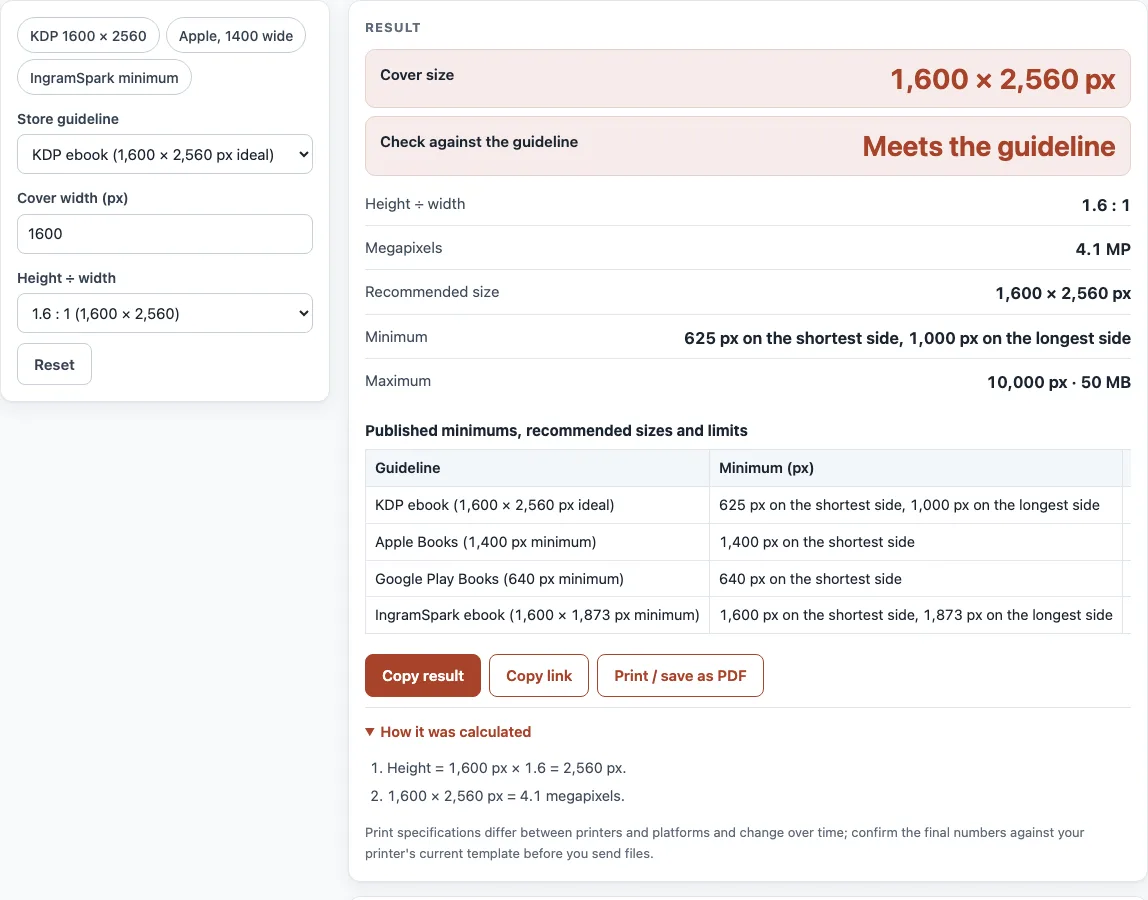
Expand the “Store guideline” list and select the store you are publishing to. Or skip the list and pick a preset: “KDP 1600 × 2560”, “Apple, 1400 wide” or “IngramSpark minimum”.
Enter a value in “Cover width (px)”. A KDP ebook works best at 1,600 px wide.
Pick a value for “Height ÷ width”: “1.6 : 1 (1,600 × 2,560)”, “1.5 : 1 (2 : 3)” or “1.333 : 1 (3 : 4)”. For a shape outside those, select “Custom ratio” and type a figure into “Custom ratio (height ÷ width)”.
Review the output. The “Cover size” field gives width and height in pixels, while “Check against the guideline” reports whether that size fits. Also listed: “Height ÷ width”, “Megapixels”, “Recommended size”, “Minimum” and “Maximum”.
Beneath “Check your cover image”, press “Choose a cover image (JPG, PNG, TIFF…)” and pick the file you want.
Check each row for size, ratio, file size, file type and portrait orientation. Every row reports pass, warning or fail based on the guideline picked in step 1. Change the guideline to compare the same image against another store.
The guideline table is handy when one cover goes to several stores. Since nothing leaves your device, a draft can be tested before it goes live.
What size should an ebook cover be?
A common target is 1,600 × 2,560 px, a 1.6 : 1 ratio, which is the KDP ebook ideal. Apple Books asks for at least 1,400 px on the shortest side, so the right size depends on the store you use.
The tool works out the height from the width with height = round(width × ratio). Megapixels is width × height ÷ 1,000,000. For 1,600 px wide at 1.6 : 1, the height is 2,560 px and the image is 4.1 MP. Store guidelines change, so check the store’s current help page before you upload.
What is the minimum size?
Each store sets its own minimum. KDP requires 625 × 1,000 px, Apple Books requires 1,400 px on the shortest side, Google Play Books requires 640 px, and IngramSpark requires 1,600 × 1,873 px. Google does not say which side the 640 px applies to, so the tool checks the shorter side.
What ratio does an ebook cover need?
KDP asks for a height of at least 1.6 times the width, a 1.6 : 1 ratio. Apple Books states no ratio limit; it asks for front-cover art only, with no 3D mock-ups.
The ratio is height ÷ width, so a 1.6 : 1 ratio means the cover is 1.6 times as tall as it is wide.
How big can the file be?
File size limits are 50 MB for KDP, 100 MB or less for IngramSpark, and under 2 GB for Google Play Books. The file type check also applies. KDP accepts TIFF or JPEG, and the tool flags other file types for KDP.
Pixel limits are separate from file size. KDP allows at most 10,000 px in either direction, and Google Play Books allows at most 7,200 px.
Can I check my image without uploading it?
Yes. The check runs in your browser, and the file stays on your device, so nothing is uploaded. Some browsers cannot decode TIFF files. In that case, the tool says it cannot read the file, so save a JPEG or PNG copy and check again.
Sources (checked 13 October 2026): KDP Help · Apple Books formatting guide · Google Play Books Help · IngramSpark file creation guide
Worked examples
| Input | Result |
|---|---|
| KDP ebook (1,600 × 2,560 px ideal), 1600 px wide | 1,600 × 2,560 px — Meets the guideline |
| Apple Books (1,400 px minimum), 1400 px wide | 1,400 × 2,100 px — Meets the guideline |
| Google Play Books (640 px minimum), 1200 px wide | 1,200 × 1,600 px — Meets the guideline |
| IngramSpark ebook (1,600 × 1,873 px minimum), 1600 px wide | 1,600 × 2,263 px — Meets the guideline |
Calculated by the tool above; open it with the same values to see each step.
Frequently asked questions
What does a warning mean in the check?
A warning means the image meets the minimum but is below the recommended size. A fail means it breaks a rule, such as a size below the minimum for the store you chose.
Why does a 1,600 × 1,872 px image fail IngramSpark?
IngramSpark requires at least 1,873 px on the longest side, and 1,872 px is one pixel short. Increase the longer side to 1,873 px or more, then check again.
Can I use a 3D ebook cover template?
Apple Books does not accept 3D mock-ups or photos of the cover, so a 3D ebook cover template will not suit that store. Use a flat front cover image instead. The tool does not check for 3D mock-ups.
What is a good ebook cover template size?
Start at 1,600 × 2,560 px: it meets the KDP ideal and the Apple Books, Google Play Books and IngramSpark minimums. Design at that size, then export a JPEG.
Should an ebook cover be JPEG or PNG?
It depends on the store: KDP accepts JPEG or TIFF, IngramSpark asks for JPG only, and the image check flags a file type the chosen store does not list. A high-quality JPEG is accepted by KDP, IngramSpark and Google Play Books, and Apple Books states no file-type limit.
Does the tool check DPI?
No. The check list does not include DPI. KDP recommends 300 PPI, and IngramSpark asks for 350 dpi, so check resolution separately with a DPI calculator.
Related tools
- Book cover size calculator: compare cover dimensions for both print and ebook formats.
- Book spine width calculator: helpful once your cover has to wrap around a paperback spine.
- Book cover template generator: a ready layout gives you somewhere to begin.
- Dust jacket size calculator: sizes the jacket for a hardcover edition.
- Standard book sizes chart: lays out the common trim sizes side by side.
- DPI calculator: finds the resolution your cover image needs.