DPI Calculator
Choose what to solve for, then enter pixels, print size or DPI to get the missing value and the print quality.
Recent
Your last 10 settings, saved only in this browser. Nothing is uploaded.
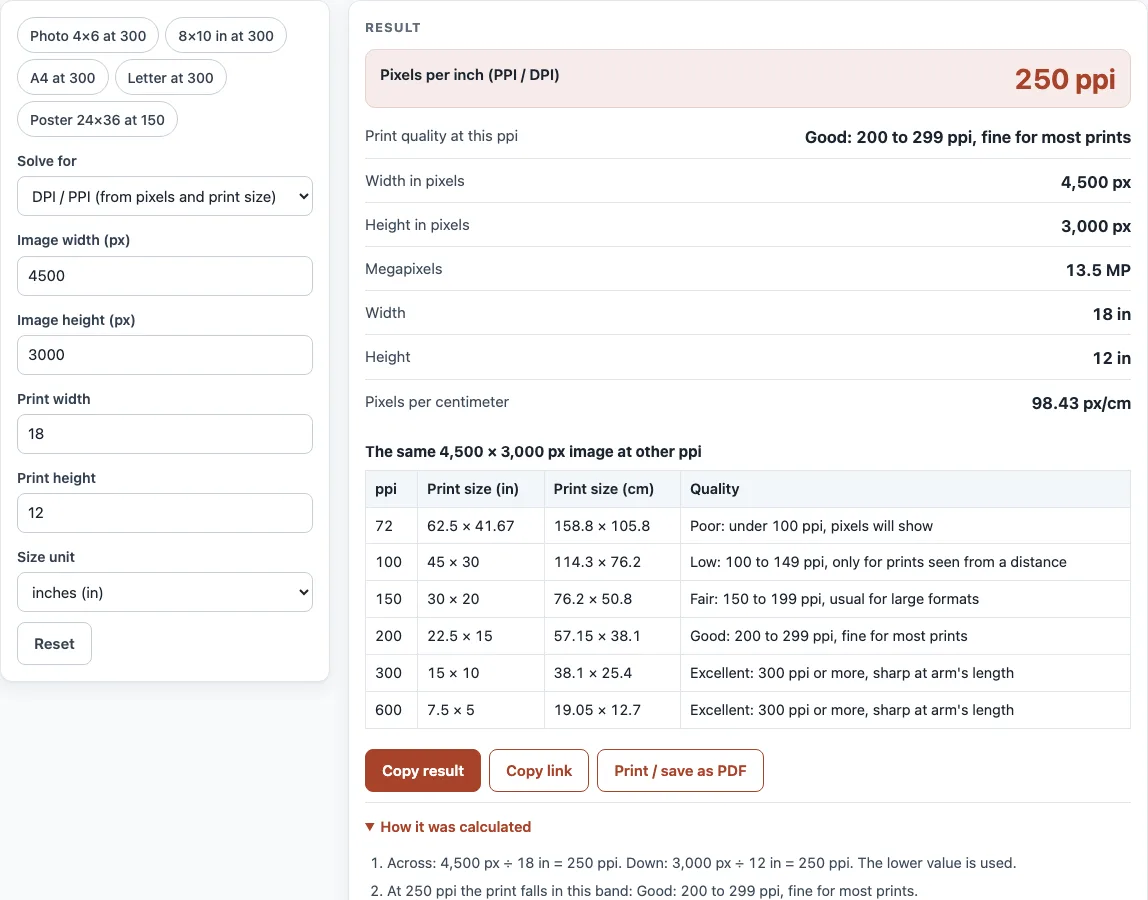
How to use the DPI calculator
- Optional: pick a preset from the list: “Photo 4×6 at 300”, “8×10 in at 300”, “A4 at 300”, “Letter at 300” or “Poster 24×36 at 150”.
- Open “Solve for” and choose one option: “DPI / PPI (from pixels and print size)”, “Pixels needed (from print size and ppi)”, “Print size (from pixels and ppi)” or “Screen ppi (from resolution and diagonal)”.
- Choose a size unit: inches (in), centimeters (cm) or millimeters (mm).
- Fill in the fields the tool shows for your choice. These can include “Image width (px)”, “Image height (px)”, “Print width”, “Print height” and “Pixels per inch (PPI / DPI)”. Always enter width and height together.
- For “Screen ppi”, enter the “Screen diagonal” in the size unit you selected.
- Read “Pixels per inch (PPI / DPI)” and “Print quality at this ppi”, then check “Print size”, “Megapixels” and “Pixels per centimeter”.
Watch for warnings. The tool shows one if the print and pixel shapes differ by more than 1 % (it then uses the lower ppi), if the ppi is under 150, or if it is over 1,200. Open “How it was calculated” to see each step.
Use “Copy result” to copy the figures, “Copy link” to share your inputs (they are saved in the URL), “Print / save as PDF” to keep a copy, or “Reset” to start again.
How do I calculate DPI?
Divide the pixel count by the print size in inches, for each side. An image 4,500 pixels wide printed 18 inches wide has 250 ppi. The tool does this for both width and height, and in “DPI / PPI” mode it reports the lower of the two results.
The rules behind this are simple:
- ppi = pixels / inches
- Pixels = round(inches × ppi)
- Print size = pixels / ppi
Since 1 in = 25.4 mm exactly, convert millimeters to inches by dividing by 25.4 first. The pixel count of an image never changes. Only its tagged ppi does. A 1,000 × 1,000 px image tagged 250 ppi prints 4 × 4 in, while the same image tagged 100 ppi prints 10 × 10 in.
Screen ppi uses the diagonal instead. Take the square root of (width² + height²) in pixels, then divide by the diagonal in inches. A 2560 × 1440 screen with a 27 in diagonal is 108.8 ppi, and a 3840 × 2160 screen at 27 in is 163.2 ppi.
PPI and DPI are not the same thing. PPI describes the image’s input resolution, while DPI describes a printer’s output dots per inch. Inkjet printers are typically 300 to 720 DPI, and laser printers 600 to 2,400 DPI. Those are printer dots, not image pixels, and this tool does not model a printer’s ink or halftone dots.
How can I check if an image is 300 DPI?
Divide the image’s width and height in pixels by 300. The results are the largest size at which the image is 300 ppi. Your image editor will show the pixel size, and you can check that the result matches the size you want to print.
For example, a 6,000 × 4,000 px image at 300 ppi prints 20 × 13.33 in (50.8 × 33.87 cm). To check a specific print size, enter the pixel size and the print size in “DPI / PPI (from pixels and print size)” and read “Pixels per inch (PPI / DPI)”. A photo ppi of 300 at your target size gives a clear, full-quality print under the usual print-shop guidance.
Sources (checked 13 October 2026): Wikipedia · carleton.ca · help.tradeprint.co.uk · Wikipedia (2)
Worked examples
| Input | Result |
|---|---|
| 4500 × 3000 px printed at 18 × 12 in | 250 ppi (Good: 200 to 299 ppi, fine for most prints) |
| 4 × 6 in print at 300 ppi | 1,200 × 1,800 px (2.16 MP) |
| 210 × 297 mm print at 300 ppi | 2,480 × 3,508 px (8.7 MP) |
| 6000 × 4000 px at 300 ppi | 20 × 13.33 in (50.8 × 33.87 cm) |
| 2560 × 1440 px screen, 27 in diagonal | 108.8 ppi |
Calculated by the tool above; open it with the same values to see each step.
Frequently asked questions
Is 72 pixels per inch 300 DPI?
No. At 72 ppi the same pixels print about 4.17 times larger in each direction than at 300 ppi. A 1,200 × 1,800 px image prints 16.67 × 25 in at 72 ppi, but 4 × 6 in at 300 ppi.
What is a good ppi for print?
About 300 ppi for close viewing. A trade printer calls 150 DPI a good compromise for large formats. One print shop gives 300 at 0.6 m viewing distance, 120 at 1.5 m, 60 at 3 m and 18 at 10 m. The tool’s bands are 300 or more excellent, 200 to 299 good, 150 to 199 fair, 100 to 149 low and under 100 poor. These are common print-shop guidance, not a standard.
300 ppi resolution: what size is it?
Divide the pixels by 300 to get inches. A 6,000 px wide image at 300 ppi is 20 in wide. A 1,200 × 1,800 px image at 300 ppi is 4 × 6 in.
How many pixels for A4, Letter or 4x6?
At 300 ppi, A4 (210 × 297 mm) needs 2,480 × 3,508 px (8.7 MP). Letter (8.5 × 11 in) needs 2,550 × 3,300 px (8.415 MP). A 4 × 6 in print needs 1,200 × 1,800 px (2.16 MP). For other sizes, use “Pixels needed (from print size and ppi)”.
Is there a ppi to DPI converter?
No conversion is needed for image files. A 300 ppi image is a “300 dpi” file, because the number is the same. Printer DPI is a separate figure for printer dots, and no conversion factor links the two.
What is screen ppi?
Screen ppi is the pixel density of a display: the diagonal in pixels divided by the diagonal in inches. A 27 in monitor at 2560 × 1440 has 108.8 ppi. It describes the screen, not your image, so it does not change how large a photo prints. Mouse “DPI” is a different measurement again and is not covered here.
Related tools
- Print resolution calculator: use it when you want to plan print resolution from another starting point.
- Image DPI checker: use it to check the DPI of an image file.
- PDF DPI checker: use it to check the image resolution inside a PDF.
- PDF preflight check: use it to review a PDF before sending it to print.
- RGB to CMYK converter: use it to convert colors from screen RGB to print CMYK.
- CMYK to RGB converter: use it to convert print CMYK colors back to RGB.
- Book cover template generator: use it to set up a cover at the right size and resolution.
- Paper size chart: use it to look up standard paper sizes in inches and millimeters.