Convert CMYK to RGB
Type the C, M, Y and K percentages to get the RGB values, the hex code and a swatch.
Recent
Your last 10 settings, saved only in this browser. Nothing is uploaded.
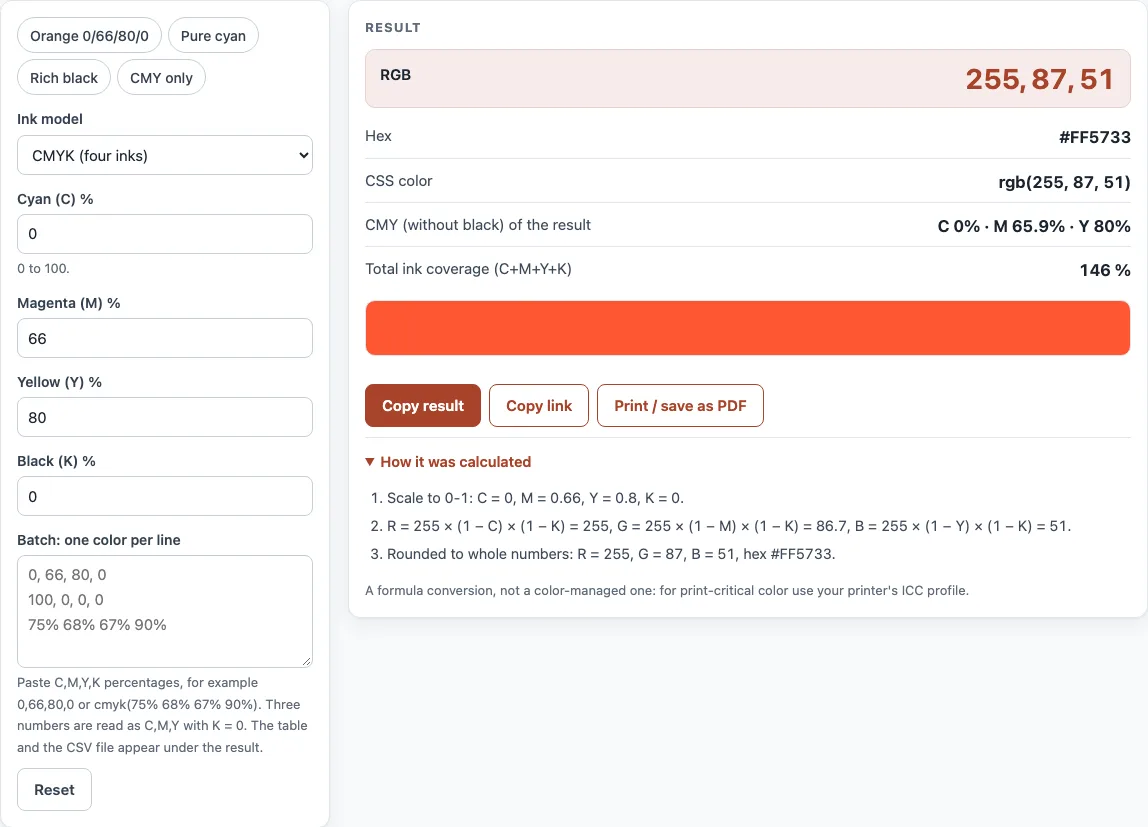
How to use the CMYK to RGB converter
- Type a number from 0 to 100 into “Cyan (C) %”.
- Fill in “Magenta (M) %”, “Yellow (Y) %” and “Black (K) %” in the same way.
- Confirm the “Ink model” setting. Leave it on “CMYK (four inks)” for four-ink colors, or pick “CMY (no black)” to disregard K.
- Look at the “RGB” headline, then compare the “Hex” and “CSS color” results.
- Review “Total ink coverage (C+M+Y+K)”. When a warning shows total ink above 300 %, reduce one or more inks.
- Study the swatch for the color, then press “Copy result” or “Copy link” to save it.
- For a batch of colors, put one per line in “Batch: one color per line”. Write four numbers for CMYK, like
cmyk(10% 20% 30% 0%), or three numbers for CMY. Check the table (first 50 rows), then choose “Download CSV”.
Presets such as “Orange 0/66/80/0”, “Pure cyan”, “Rich black” and “CMY only” fill the fields with sample values, a quick way to watch the outputs shift. Each line of the CSV holds the input, R, G, B, hex, every ink percentage and the total ink percentage, so a full brand palette can be sorted in a spreadsheet. Unreadable lines appear as invalid in the table rather than disappearing.
How do I convert CMYK to RGB?
The converter relies on a multiplication formula. Each RGB channel begins at 255, which is full brightness, and cyan, magenta, yellow and black ink reduce it. Cyan removes red, magenta removes green and yellow removes blue. Black darkens all three channels together.
R = 255 × (1 − C) × (1 − K) G = 255 × (1 − M) × (1 − K) B = 255 × (1 − Y) × (1 − K)
C, M, Y and K are fractions from 0 to 1, so 66 % becomes 0.66. Results are rounded to whole numbers. This formula works for any CMYK value, whether it is a single color or a whole list.
Start with the default values 0, 66, 80, 0. Red comes to 255 × 1 × 1 = 255. Green is 255 × 0.34 = 86.7, which rounds to 87. Blue is 255 × 0.20 = 51. That gives RGB 255, 87, 51, or hex #FF5733. With only cyan at 100 %, the output is 0, 255, 255 (#00FFFF).
Why does CMYK look different on screen?
A screen makes color by adding red, green and blue light, while ink on paper takes light away. CMYK colors printed on uncoated paper look duller than the same numbers on coated paper, and both differ from a monitor. This page’s formula treats inks as perfect filters, so it shows the idealized screen color of a CMYK value, not how a particular press will print it. Very saturated RGB colors, especially bright greens and blues, have no exact CMYK match at all.
What is the best way to convert CMYK to RGB?
No universal formula links CMYK and RGB exactly. Accurate conversion depends on the printer, paper and ink set, and it is described by an ICC profile. This tool is device-independent and uses no ICC profile, so a printed color will look different on screen, even when the numbers match. For exact color, convert in design software with the right ICC profile, and use this converter for quick estimates.
Total ink is another limit. Commonly cited limits are 300 % (SWOP, FOGRA39) and 320 % (GRACoL coated sheetfed). Printer specifications differ and change over time, so confirm the limit with your printer. A rich black mix of 75, 68, 67, 90 totals 300 %, and the formula returns #060808, which is almost black on screen.
Sources (checked 13 October 2026): RapidTables · Wikipedia · PRINTING United Alliance
Worked examples
| Input | Result |
|---|---|
| C 0 %, M 66 %, Y 80 %, K 0 % | RGB 255, 87, 51 (#FF5733) |
| C 100 %, M 0 %, Y 0 %, K 0 % | RGB 0, 255, 255 (#00FFFF) |
| C 75 %, M 68 %, Y 67 %, K 90 % | RGB 6, 8, 8 (#060808) |
| C 20 %, M 40 %, Y 60 % (CMY) | RGB 204, 153, 102 (#CC9966) |
Calculated by the tool above; open it with the same values to see each step.
Frequently asked questions
What hex code is CMYK 0, 0, 0, 100?
Pure black ink at K 100 % produces RGB 0, 0, 0, or #000000. Whatever the other inks are, a color with K at 100 % turns black, since the formula scales every channel by (1 − K).
Can I use this as a CMY to RGB converter?
Yes, it works that way. Choose “CMY (no black)” under “Ink model”. K is disregarded here, so 20, 40, 60 returns 204, 153, 102 (#CC9966).
Why does the RGB look brighter than my print?
Monitors give off light, whereas printed inks soak up light from the paper. Also, the formula lacks an ICC profile for your particular printer, paper or ink set, which makes the match approximate.
Is this the best way to convert CMYK to RGB for final artwork?
Final artwork is best handled by an ICC-profile-based tool inside your design software, because it accounts for the actual printing conditions. This converter suits a quick estimate or a check on one color value.
Can I convert a CMYK PDF or image file with this tool?
No, it handles color values alone and cannot open PDF or image files. Type the percentages in by hand, or paste a list into the batch box.
Does the tool check my total ink?
Yes, the sum appears in “Total ink coverage (C+M+Y+K)”, and a warning fires when total ink tops 300 %. Confirm your printer’s current limit before printing.
Related tools
- DPI calculator: works out pixel dimensions from a print size and resolution.
- Print resolution calculator: checks whether an image holds enough resolution for the size you plan to print.
- Image DPI checker: reads the resolution stored in an image file.
- PDF DPI checker: shows the image resolution inside a PDF.
- PDF preflight check: flags print-readiness problems in a PDF before you send it off.
- RGB to CMYK converter: helpful when screen colors need converting to CMYK values for print.
- Book cover template generator: builds a cover layout with the correct dimensions for a print edition.
- Paper size chart: lets you compare standard paper sizes for a print project.