Business Card Size by Country
Pick a country or standard to see the business card size in mm and inches, then get the print file size with bleed and the safe area for your design.
Recent
Your last 10 settings, saved only in this browser. Nothing is uploaded.
There is no single business card size worldwide, and business card dimensions change from country to country. In the United States and Canada a card is 3.5 x 2 inches (88.9 x 50.8 mm), and much of Europe uses 85 x 55 mm. This free tool lists the sizes by country and standard, then works out the print file for the one you pick: the size with bleed in millimetres, inches and pixels, and the safe area for text. It runs in your browser, nothing is uploaded, and no sign-up is needed.
The sizes come from Wikipedia’s table of business card sizes, which says there is no standard, so confirm the size with your printer. The bleed and safe margin start at 3 mm as a starting value, not a standard, and you can change them.
How to use the Business Card Size tool
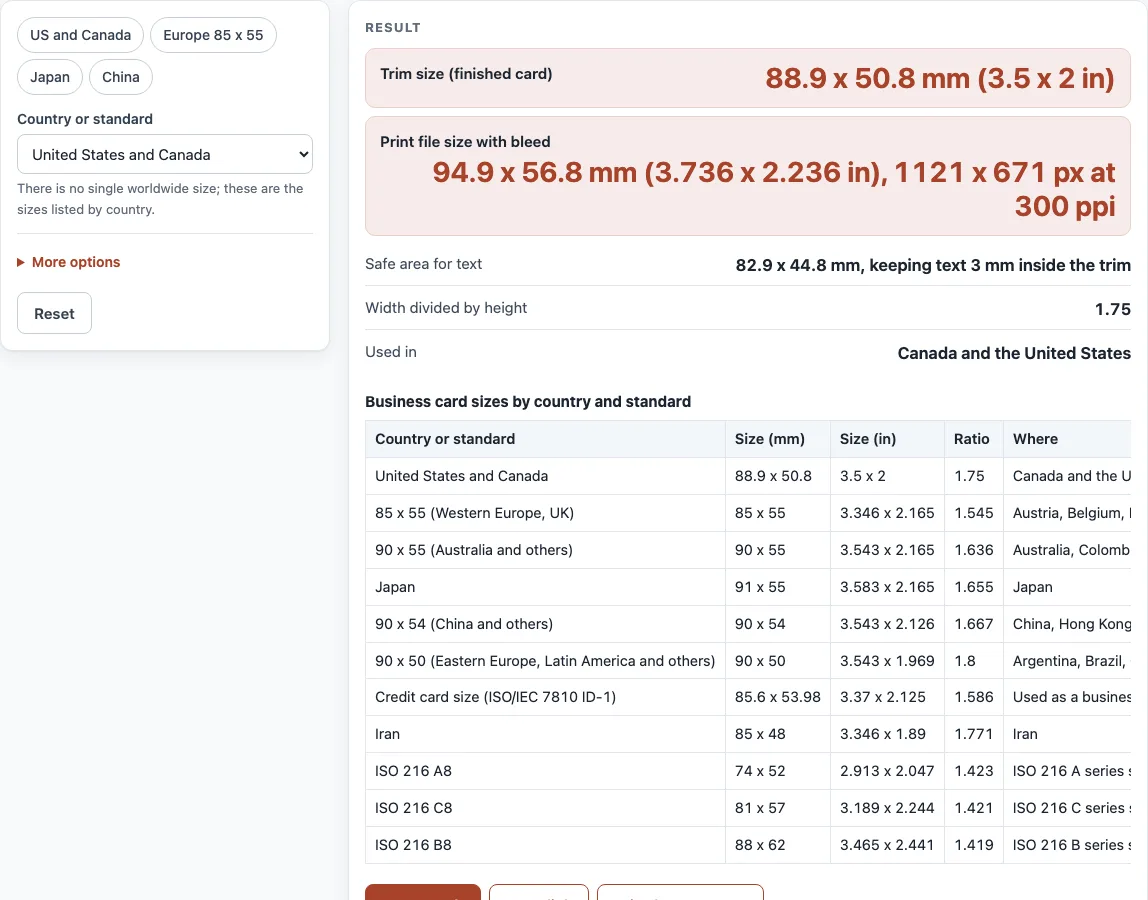
- Choose the “Country or standard”. The list has the US and Canada, 85 x 55 mm (Western Europe and the UK), 90 x 55 mm, Japan, 90 x 54 mm (China and others), 90 x 50 mm, the credit card size, Iran and the ISO A8, C8 and B8 sizes.
- Read “Trim size (finished card)”. It gives millimetres and inches.
- Read “Print file size with bleed”. It adds the bleed on every side and gives the size in millimetres, inches and pixels at your resolution.
- Open “More options” to change the “Bleed on each side (mm)”, the “Safe margin inside the trim (mm)” and the “File resolution (pixels per inch)”. They start at 3 mm, 3 mm and 300 ppi.
- Read “Safe area for text” and keep text and logos inside that rectangle.
- Read “Width divided by height” to compare the shape of two sizes, and “Used in” for the countries listed for the size.
- Read any warning under the result, such as the one for no bleed or a low resolution. The table below lists every size.
- The four preset buttons show the US and Canada size, the 85 x 55 mm European size, Japan and China.
With no changes the page shows the US and Canada card: 88.9 x 50.8 mm, with a 94.9 x 56.8 mm file (1121 x 671 px at 300 ppi).
What is the standard business card size?
It depends on the country. In the United States and Canada the card is 3.5 x 2 inches, which is 88.9 x 50.8 mm and a width-to-height ratio of 1.75. The 85 x 55 mm card (ratio 1.545) is listed for Austria, Belgium, France, Germany, Ireland, Italy, the Netherlands, Portugal, Spain, Switzerland, Turkey and the United Kingdom. Japan uses 91 x 55 mm, China, Hong Kong, Malaysia and Singapore use 90 x 54 mm, and a group of countries from Brazil to South Korea use 90 x 50 mm. Wikipedia notes the 85 x 55 mm size is close to a payment card, which makes cards easier to store.
The ISO 216 sizes A8 (74 x 52 mm), C8 (81 x 57 mm) and B8 (88 x 62 mm) are also listed. If you send cards across borders, the safest choice is to ask what the recipient’s holders and wallets fit.
The shapes differ more than the sizes suggest. The width-to-height ratio is 1.75 for the US card, 1.665 for Japan, 1.667 for 90 x 54 mm, 1.545 for 85 x 55 mm and 1.419 for ISO B8, so a design made for one size does not simply scale to another: a wider card has a longer, shorter shape, and text may need to move. To convert between units, divide millimetres by 25.4, so 88.9 mm is 3.5 inches.
What size should a business card file be?
The file is the trim size plus bleed on every side. For the US card with a 3 mm bleed, that is 94.9 x 56.8 mm, or 1121 x 671 pixels at 300 ppi. Keep text and logos inside the safe margin so a small cutting shift does not clip them. The 3 mm values are starting points, not a standard, so use your printer’s template when it gives other numbers.
Sources (checked 17 October 2026): Wikipedia, Business card
Worked examples
| Input | Result |
|---|---|
| United States and Canada | 88.9 x 50.8 mm |
| 85 x 55 (Western Europe, UK) | 85 x 55 mm |
| Japan | 91 x 55 mm |
| Credit card size (ISO/IEC 7810 ID-1) | 85.6 x 53.98 mm |
| ISO 216 A8 | 74 x 52 mm |
Calculated by the tool above; open it with the same values to see each step.
Frequently asked questions
What is the size of a business card in inches?
In the United States and Canada, 3.5 x 2 inches. The 85 x 55 mm European size is 3.346 x 2.165 inches.
What is the size of a business card in mm?
88.9 x 50.8 mm in the US and Canada, 85 x 55 mm in much of Europe, 91 x 55 mm in Japan and 90 x 54 mm in China.
What size should a business card design be with bleed?
Add the bleed to each side. With 3 mm bleed, a US card is 94.9 x 56.8 mm and a 85 x 55 mm card is 91 x 61 mm.
How many pixels is a business card at 300 ppi?
A US card with a 3 mm bleed is 1121 x 671 pixels. Without bleed it is 1050 x 600 pixels, which is 3.5 x 2 inches at 300 ppi.
Is a business card the same size as a credit card?
Close, but not identical. The credit card size is 85.60 x 53.98 mm, and Wikipedia lists it as a business card size for Australia. The usual US card is wider and shorter.
Is there an official business card size?
No. Wikipedia’s table says there is no single standard, and lists the sizes in use by country. The tool shows the sizes from that table.
How do I convert millimetres to inches for a card?
Divide by 25.4. A card of 88.9 mm is 3.5 inches, and 50.8 mm is 2 inches. The tool shows both units for every size.
Does the tool upload what I enter?
No. It runs in your browser and nothing is uploaded.
Related tools
- Postcard Size: Use it to check a card against the postal limits and get its file size.
- Paper Size Chart: Use it to compare paper sizes drawn to scale.
- DPI Calculator: Use it to check the pixels per inch of an image at a print size.
- RGB to CMYK: Use it to convert a screen color for print.
- Paper and Book Sizes: Use it to see all the paper and book size tools in one place.