Standard Booklet Sizes and Page Calculator
Choose a finished booklet size and page count to get the flat sheet size, the pages rounded up to a multiple of 4, the sheets you need and the page order.
Recent
Your last 10 settings, saved only in this browser. Nothing is uploaded.
How to use the booklet calculator
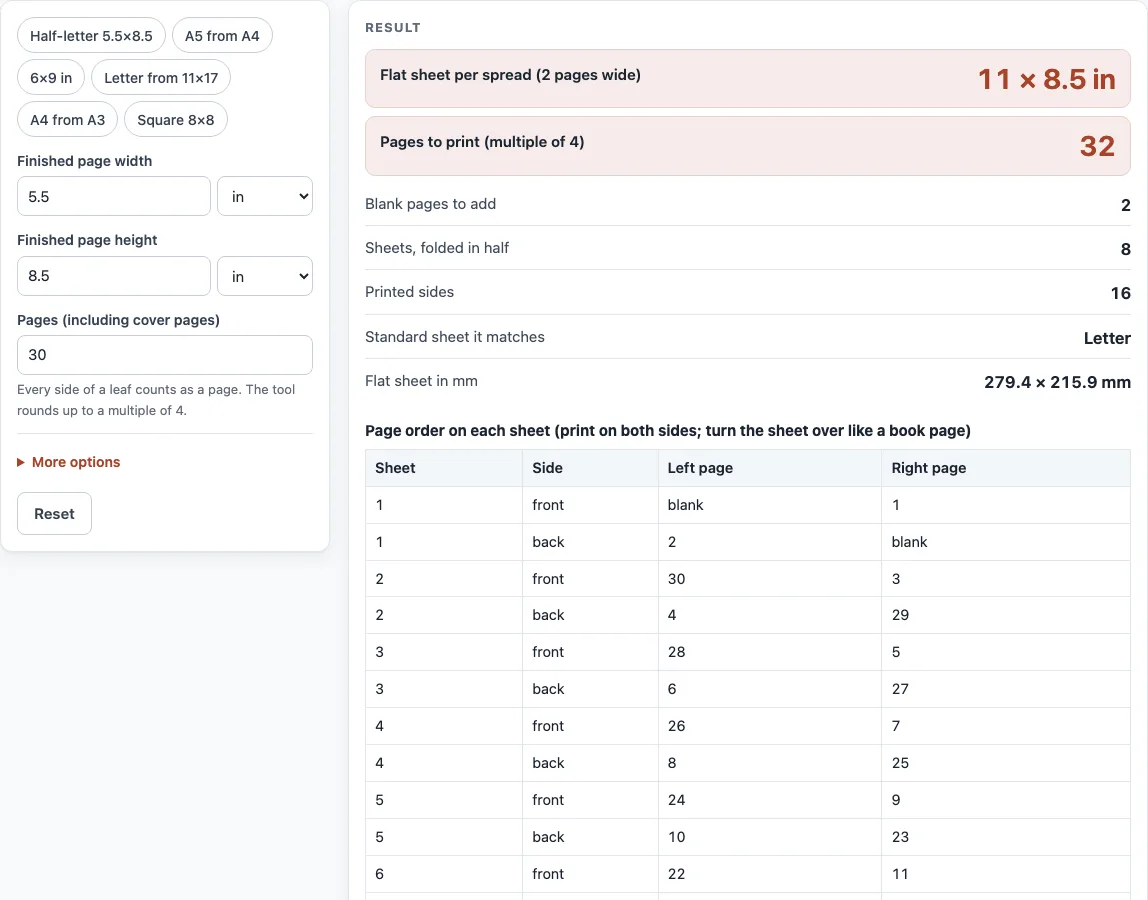
- Enter the “Finished page width” and “Finished page height” of one page. Choose in, mm or cm. You can also click a preset, such as Half-letter 5.5×8.5 or A5 from A4.
- Enter the total in “Pages (including cover pages)”. Count the covers in this number.
- Read “Flat sheet per spread (2 pages wide)” and “Standard sheet it matches”. The tool names a paper size when the flat size is within 1 mm of it, in either orientation.
- Check “Pages to print (multiple of 4)” and “Blank pages to add” to see how many padding pages the booklet needs.
- Note “Sheets, folded in half” and “Printed sides” to estimate how much printing you need.
- Open “More options” and set “Saddle-stitch page limit” to match your printer. The default is 60. A warning appears if your page count is above it.
- Use the table “Page order on each sheet (print on both sides; turn the sheet over like a book page)” to set up your file.
The drawing of the flat sheet shows where the fold goes. Use “Copy result” or “Copy link” to share your numbers, “Print / save as PDF” to keep a copy, and “Reset” to clear the inputs.
What are standard booklet sizes?
A university print service (the SAIC Service Bureau) lists 5.5 × 8.5, 8.5 × 11, 9 × 12 and 9.5 × 13 in as its standard saddle-stitch sizes. In ISO countries, A5 and A4 are the usual booklet sizes.
The finished size is the page a reader holds. The flat size is the sheet the printer feeds through, which is twice the finished width by the same height, because the sheet folds once down the middle. So:
Flat sheet = (2 × finished width) × finished height
An A5 booklet (148 × 210 mm finished) has a flat size of 296 × 210 mm, which matches A4. An A4 booklet folds from A3, with a flat size of 420 × 297 mm. An 8.5 × 11 in booklet has a flat size of 17 × 11 in, which is Tabloid. A 5.5 × 8.5 in booklet has a flat size of 11 × 8.5 in, which is Letter. The “Standard booklet sizes” table in the tool lists these pairings.
How do I order pages for a booklet?
Print the sheets in the order given by the page-order table. With N as the rounded page count and sheet 1 as the outermost sheet, the front of sheet i shows (N − 2i + 2 | 2i − 1), and the back shows (2i | N − 2i + 1). For 8 pages, sheet 1 has 8 | 1 on the front and 2 | 7 on the back, and sheet 2 has 6 | 3 on the front and 4 | 5 on the back.
Each folded sheet holds 4 pages, so the page count is rounded up to a multiple of 4:
Pages to print = 4 × ceil(pages ÷ 4) Blank pages = pages to print − pages Sheets = pages to print ÷ 4 Printed sides = 2 × sheets
For 10 pages, the tool uses 12 printed pages. Sheet 1 front shows blank | 1, and sheet 1 back shows 2 | blank. The two blanks become pages 11 and 12 at the back of the booklet, and because the last pages share a sheet with the first ones, they print on the outermost sheet, beside pages 1 and 2.
Sources (checked 13 October 2026): sites.saic.edu · ISO
Worked examples
| Input | Result |
|---|---|
| 5.5 × 8.5 in, 30 pages | flat sheet 11 × 8.5 in; 32 pages on 8 sheets; 2 blank page(s) to add |
| 148 × 210 mm, 24 pages | flat sheet 296 × 210 mm; 24 pages on 6 sheets; 0 blank page(s) to add |
| 8.5 × 11 in, 16 pages | flat sheet 17 × 11 in; 16 pages on 4 sheets; 0 blank page(s) to add |
| 6 × 9 in, 50 pages | flat sheet 12 × 9 in; 52 pages on 13 sheets; 2 blank page(s) to add |
Calculated by the tool above; open it with the same values to see each step.
Frequently asked questions
What size is a half-letter booklet?
A half-letter booklet is 5.5 × 8.5 in. It is made from a Letter sheet, 11 × 8.5 in (279.4 × 215.9 mm), folded in half.
How many pages can a saddle-stitched booklet have?
The page count must be a multiple of 4, including covers. SAIC recommends 8 to 60 pages and allows up to 100 on the thinnest paper. Other printers quote other limits, so set your own in “More options”.
What paper size for a booklet?
Use a sheet that matches the flat size: 2 × finished width × finished height. An A5 booklet needs A4 paper, and a 5.5 × 8.5 in booklet needs Letter. The “Standard sheet it matches” output names the paper when the flat size is within 1 mm of it.
Does the tool include bleed or binding margin?
No. Creep (shingling), bleed and binding margin are not modelled, so add them to your own file.
Is my file uploaded when I use the tool?
No. The tool runs in your browser, nothing is uploaded, and there is no sign-up.
Do I need to confirm the numbers with my printer?
Yes. Printer specifications differ and change, so check the final page count, sizes and page limit against your printer’s current template before you print.
Related tools
- Paper size chart: Compare ISO and US paper sizes when you pick the sheet for your booklet.
- A3 size in inches: Check the A3 dimensions when an A4 booklet folds from an A3 sheet.
- Legal size paper dimensions: Look up Legal paper when your flat sheet is a US size other than Letter.
- Standard book sizes chart: Compare booklet sizes with common trade book sizes.
- DPI calculator: Check the resolution of images you plan to place on booklet pages.
- Print resolution calculator: Work out whether an image is sharp enough at your printed page size.