Book Spine Width Calculator
Enter the page count and paper to get the spine width, or a target spine to get the page count that fits.
Recent
Your last 10 settings, saved only in this browser. Nothing is uploaded.
This book spine calculator gives the spine width of a book from its page count and paper, or finds the page count that fits a target spine width. It runs in your browser, is free, and needs no sign-up. Results show the spine in inches, millimeters and points together, so you can compare the number with whichever unit your printer uses.
Use it when you are setting up a paperback or hardcover cover and need to know how wide the spine panel should be. Choose “Paperback (perfect bound)” or “Hardcover (case laminate)” in Binding, and the tool adds the board thickness for hardcovers. Start with a preset or enter your own page count and paper.
How to use the book spine calculator
- Open “Solve for” and choose “Spine width from page count” to find the width of a book you already have, or “Page count for a target spine” to find the page count that fits a width you need.
- Type the number of printed pages in “Page count”. Each leaf (one sheet) counts as 2 pages.
- Select your “Paper / stock”. The list includes the KDP and Lulu figures, a Lulu hardcover table, and a custom option where you enter “Pages per inch (PPI)” or “Thickness” from your own paper.
- Choose “Binding”: “Paperback (perfect bound)” or “Hardcover (case laminate)”.
- In page-count mode, enter the “Target spine width” in inches, millimeters or points.
- Read “Spine width” and “Spine width in pixels”; in page-count mode, read “Page count (even, fits the target)” and “Next even page count”.
- Read any warning beside the result, such as the minimum page count for spine text or a page count below 24.
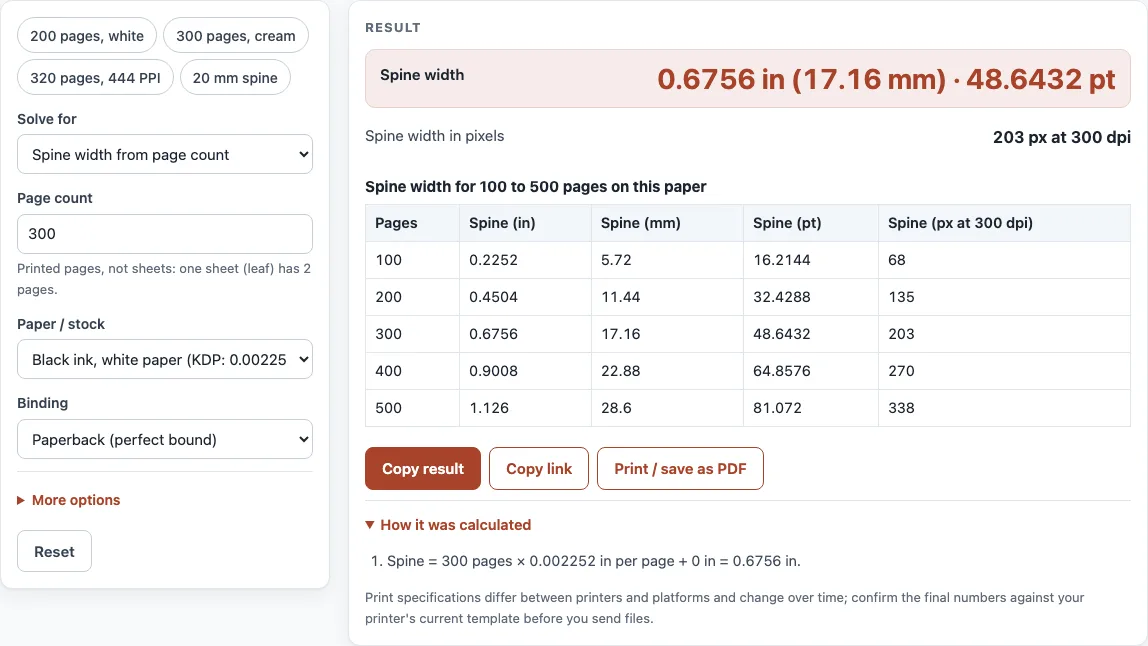
The presets “200 pages, white”, “300 pages, cream”, “320 pages, 444 PPI” and “20 mm spine” fill in common cases. Under “More options”, “Pixel resolution (dpi)” defaults to 300 and “Board thickness (each of two)” to 2 mm. The table shows the spine for 100 to 500 pages on the paper you chose.
How to calculate book spine width
Spine width is the page count multiplied by the thickness of one page, plus any fixed amount the printer adds: spine = pages × thickness per page + fixed part. On KDP white paper (0.002252 in per page), 200 pages make a 0.4504 in spine. Lulu’s softcover formula, (pages ÷ 444) + 0.06 in, adds a fixed 0.06 in. For a hardcover on a paper with a linear thickness, add two board thicknesses as well: hardcover = paper + 2 × board. Set “Binding” to “Hardcover (case laminate)” and the tool applies this for you.
How to calculate the spine width of a book from caliper?
Divide the leaf caliper by 2 to get the thickness of one page, then multiply by the number of pages. A leaf is one sheet, and it carries two pages, so a leaf that measures 0.0045 in gives 0.00225 in per page. Thickness per page also equals 1 ÷ PPI, so if your paper is listed in pages per inch, divide 1 by that number instead.
How many pages for a 20 mm spine?
About 314 pages on cream paper. A 20 mm spine is 0.7874 in, and 0.7874 ÷ 0.0025 = 314.96, which rounds down to 314 pages. That gives a spine of 0.785 in, or 19.94 mm. Use “Page count for a target spine” with “Target spine width” set to 20 mm, and read the result in “Largest page count that fits (any number)”.
How thick is the spine of a 300 page book?
On KDP white paper, a 300 page book has a spine of 0.6756 in, or 17.16 mm, which is 48.6432 pt. On cream, it is 0.75 in, or 19.05 mm, which is 54 pt. At 300 dpi the white spine is 203 pixels wide (0.6756 × 300 = 202.68, rounded to the nearest pixel).
Sources (checked 13 October 2026): KDP Help · Lulu spine width · IngramSpark file creation guide
Worked examples
| Input | Result |
|---|---|
| 300 pages, Black ink, white paper (KDP: 0.002252 in per page) | Spine 0.6756 in (17.16 mm) · 48.6432 pt |
| 300 pages, Black ink, cream paper (KDP: 0.0025 in per page) | Spine 0.75 in (19.05 mm) · 54 pt |
| 320 pages, Standard paper, 444 pages per inch (Lulu: pages ÷ 444 + 0.06 in) | Spine 0.7807 in (19.83 mm) · 56.2119 pt |
| Target spine 20 mm, Black ink, cream paper (KDP: 0.0025 in per page) | 314 pages (spine 0.785 in (19.94 mm) · 56.52 pt) |
| 250 pages, Hardcover spine table, 24–800 pages (Lulu) | Spine 0.8125 in (20.64 mm) · 58.5 pt |
Calculated by the tool above; open it with the same values to see each step.
Frequently asked questions
Does cream paper make a wider spine?
Yes. KDP lists cream at 0.0025 in per page and white at 0.002252 in, so every 100 pages on cream adds about 0.0248 in of spine.
Why does the spine differ between printers?
Each printer’s paper has its own thickness, and some printers use their own formula, so use the figure from the printer you order from. IngramSpark publishes no paper thickness in its file creation guide; take its spine width from its own cover template and type a custom PPI or thickness here.
Do saddle stitch books have a spine?
No. Saddle stitch and coil-bound books have no spine, so the spine result does not apply to them.
Does the hardcover spine include the boards?
Yes. With “Hardcover (case laminate)” selected, the result adds two boards, each set by “Board thickness (each of two)”, which defaults to 2 mm.
Why should I use an even page count?
Pages come in pairs on each leaf, and IngramSpark’s templates use an even-page spine calculation. Compare “Page count (even, fits the target)” with “Next even page count” and “Spine at the next even page count” to see the difference before you choose.
How wide does a spine need to be for text?
The tool warns when a spine is under 0.35 in, which is narrow for lettering. KDP needs 79 pages or more for spine text (80 in Cover Creator), and IngramSpark allows spine text from 48 pages. IngramSpark keeps 0.0625 in on each side of spines of 0.35 in or more, and 0.03125 in on thinner spines.
Related tools
- Book cover size calculator: use it to work out the full cover width and height around your spine.
- Book cover template generator: use it when you need a template built around your spine width.
- Dust jacket size calculator: use it to size a jacket that wraps a hardcover.
- Ebook cover size checker: use it for digital covers, which have no spine.
- Standard book sizes chart: use it to choose a trim size before you set the spine.
- Book margins calculator: use it to check inside margins near the spine.
- DPI calculator: use it to check pixel sizes at a chosen print resolution.
- PDF preflight check: use it to check the finished file before you upload it.