Book Margins Calculator
Enter the trim size and page count to get the minimum inside (gutter) and outside margins, a comfortable set and the text area left for your words.
Recent
Your last 10 settings, saved only in this browser. Nothing is uploaded.
How to use the book margins calculator
- Set the Trim size (finished page). Pick a size from the trim list, or enter a custom width and height in in, mm, cm or pt.
- Enter the Page count. The tool accepts 24 to 828 pages.
- Tick Interior has bleed (images run off the page) if any image runs to the edge of the page.
- Choose Text area uses: “Comfortable margins” or “Minimum margins”.
- Read the results: Inside (gutter) margin, Outside, top and bottom margin, Text area (width × height), Share of the page, Printer minimum and Comfortable. If you ticked bleed, also check Interior page size with bleed.
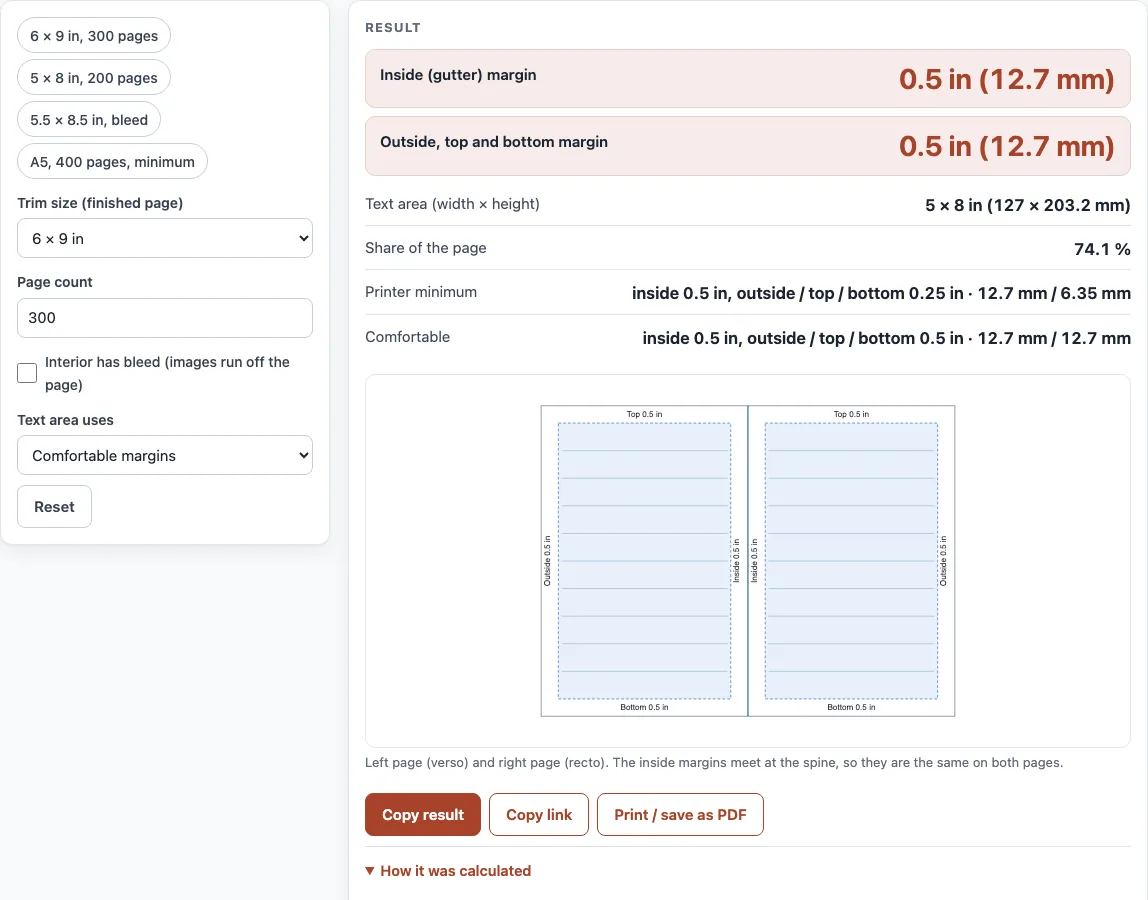
- Look at the two-page spread drawing to see how the mirrored margins sit on facing pages: the wide gutter is on the right of a left-hand page and on the left of a right-hand page.
- Change the page count and watch the inside margin step up at 151, 301, 501 and 701 pages.
Use “Copy link” to save the settings or “Print / save as PDF” to keep the numbers next to your manuscript. To start from an example, load one of the presets: “6 × 9 in, 300 pages”, “5 × 8 in, 200 pages”, “5.5 × 8.5 in, bleed” or “A5, 400 pages, minimum”. Then change the numbers to match your own book.
What are standard book margins?
Print-on-demand printers set a minimum inside margin that grows with the page count. KDP’s published table is 0.375 in for 24 to 150 pages, 0.5 in for 151 to 300, 0.625 in for 301 to 500, 0.75 in for 501 to 700, and 0.875 in for 701 to 828. Outside, top and bottom minimums are 0.25 in, or 0.375 in when bleed is included.
A comfortable setting is 0.5 in on every side, and never less than the minimum for your page count. This is a printer recommendation, not a typographic rule. IngramSpark gives a “recommended minimum 0.5 in (13 mm) on all sides” for the text block, and Lulu says to “Allow a 0.5 in Safety Margin for all content.”
What margins does a 6x9 book need?
At 151 to 300 pages, the inside minimum is 0.5 in. At printer minimum, the outside, top and bottom margins are 0.25 in. A comfortable setting uses 0.5 in on every side.
For example, a 6 × 9 in book with 300 pages set to comfortable margins has 0.5 in margins all round. Its text area is 5 × 8 in (127 × 203.2 mm), which is 74.1 % of the page.
What margins should a novel have?
Novel margins follow the same tables as any other book. Use the trim size of your novel, then find your page count band.
For example, a 5 × 8 in novel of 120 pages at printer minimum has an inside margin of 0.375 in and an outside margin of 0.25 in. Its text area is 4.375 × 7.5 in. A5 at 600 pages at minimum needs an inside margin of 0.75 in and a text area of about 4.83 × 7.77 in.
Do I need a bigger gutter for more pages?
Yes. The inside (gutter) minimum grows as the page count rises, because the pages sit deeper in the binding. Each step up the page count range raises the inside minimum by 0.125 in, from 0.375 in at the lowest band to 0.875 in at the highest.
For example, a 5.5 × 8.5 in book with 420 pages and bleed needs at least a 0.625 in inside margin and a 0.375 in outside margin at minimum. Set to comfortable, the outside margin becomes 0.5 in. The text area is 4.375 × 7.5 in, and the page with bleed is 5.625 × 8.75 in.
How do I set the margins in my document?
Set your document page to the trim size, then use mirrored (facing-page) margins with the inside value from the table. The outside, top and bottom values come from the same table. KDP asks you to enter the same value for the inside margin and the gutter.
If any page in a KDP book needs bleed, set up the whole interior with bleed. KDP bleed is 0.125 in (3.2 mm).
Sources (checked 13 October 2026): KDP Help · IngramSpark file creation guide · Lulu Help
Worked examples
| Input | Result |
|---|---|
| 6 × 9 in, 300 pages, bleed: No, Comfortable margins | Inside 0.5 in (12.7 mm), outside 0.5 in (12.7 mm); text 5 × 8 in (127 × 203.2 mm) |
| 5 × 8 in, 120 pages, bleed: No, Minimum margins | Inside 0.375 in (9.53 mm), outside 0.25 in (6.35 mm); text 4.375 × 7.5 in (111.13 × 190.5 mm) |
| 5.5 × 8.5 in, 420 pages, bleed: Yes, Comfortable margins | Inside 0.625 in (15.88 mm), outside 0.5 in (12.7 mm); text 4.375 × 7.5 in (111.13 × 190.5 mm) |
| A5 (5.83 × 8.27 in, 148 × 210 mm), 600 pages, bleed: No, Minimum margins | Inside 0.75 in (19.05 mm), outside 0.25 in (6.35 mm); text 4.83 × 7.77 in (122.68 × 197.36 mm) |
Calculated by the tool above; open it with the same values to see each step.
Frequently asked questions
What does the warning mean?
The tool warns you when the text area is less than half the page width, or when the page count is odd. Check your margins and page count if you see either warning.
What is a gutter margin?
The gutter is the inside margin, next to the binding. It needs more room than the outside margin because the pages curve into the spine, and the thicker the book, the more of the page disappears into the fold.
What is the difference between minimum and comfortable margins?
The minimum is the smallest margin the printer accepts for your page count. The comfortable set uses 0.5 in on every side (more inside where the minimum is larger), the margin IngramSpark and Lulu both recommend.
Do the printer numbers stay the same?
No. Printer specifications differ and change over time. Confirm your final margins with your printer’s current template before you send the files.
Is my manuscript uploaded when I use the tool?
No. The calculator runs in your browser, it is free, and nothing is uploaded. You do not need to sign up.
Why does the page count range stop at 24 and 828?
Those are the limits of the margin table. KDP’s page limits for black ink on white paper are also 24 to 828 pages, and cream paper is 24 to 776 pages.
Related tools
- Book cover size calculator: Use it to work out the full cover size for your book.
- Book spine width calculator: Use it to find the spine width for a paperback cover.
- Book cover template generator: Use it to build a cover template that fits your trim and spine.
- Dust jacket size calculator: Use it when you need the size of a printed dust jacket.
- Ebook cover size checker: Use it to check cover dimensions for digital editions.
- Standard book sizes chart: Use it to compare common trim sizes before you choose one.
- DPI calculator: Use it to check whether your images are sharp enough at print size.
- PDF preflight check: Use it to check your finished PDF before you upload it.