Book Jacket Size Calculator (Dust Jacket)
Enter the trim size, page count, board and flap sizes to get the flat dust jacket size and the width of every panel.
Recent
Your last 10 settings, saved only in this browser. Nothing is uploaded.
How to use the book jacket size calculator
- Enter your book’s size in the Trim size (finished page) field.
- Enter the number of pages in Page count.
- Choose your paper in Paper / stock. The options match the cover tool.
- Set Flap width. The default is 3.25 in.
- Set Board thickness (each of two). The default is 2 mm. This field is hidden for the Lulu table paper.
- Set Bleed. The default is 0.125 in.
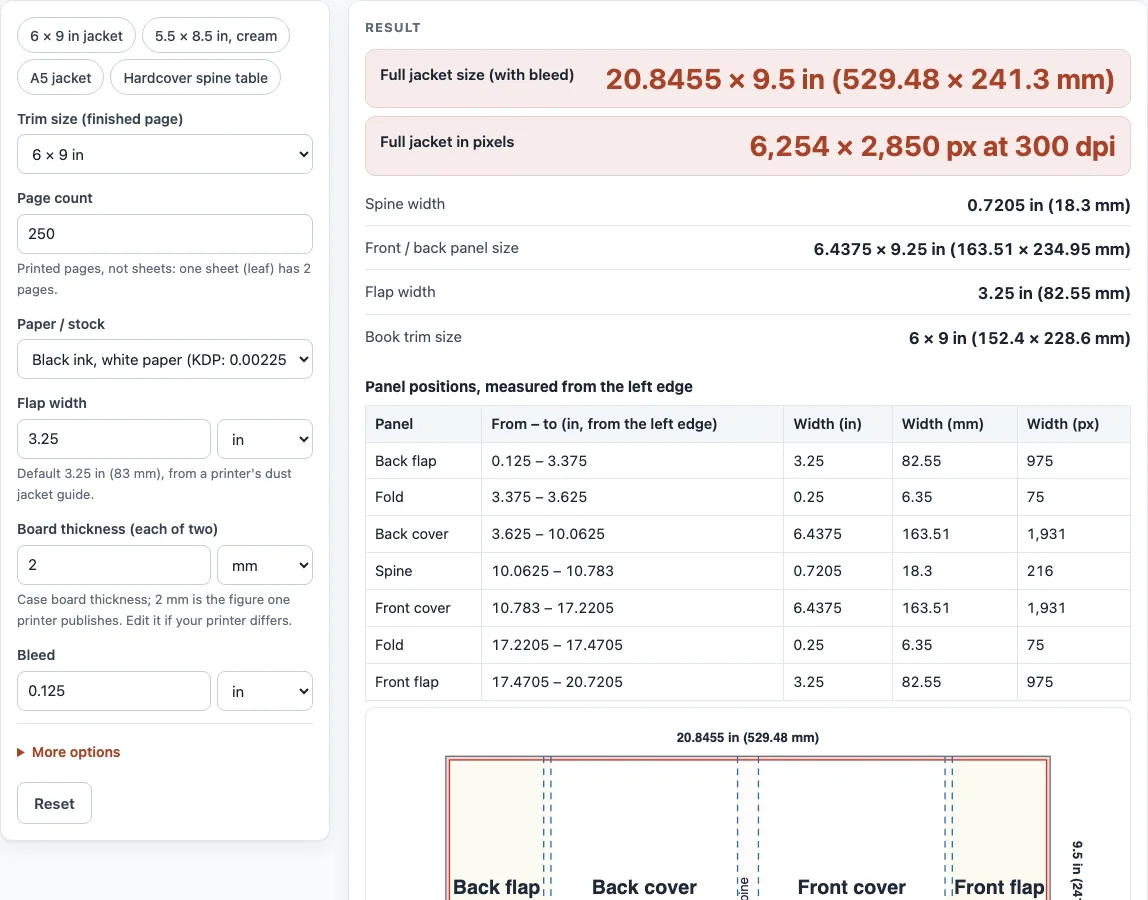
- Read the results: Full jacket size (with bleed), Full jacket in pixels, Spine width, Front / back panel size, Flap width and Book trim size.
- Check the panel table and the to-scale map, which shows Back flap, Fold, Back cover, Spine, Front cover, Fold and Front flap in order. Each row of the table gives where the panel starts and ends, measured from the left edge.
To start faster, choose one of the presets: “6 × 9 in jacket”, “5.5 × 8.5 in, cream”, “A5 jacket” or “Hardcover spine table”. For finer control, open “More options” and change “Pixel resolution (dpi)” (default 300), “Spine width override”, “Fold strip between cover and flap” (default 0.25 in), “Panel wider than trim by” (default 0.4375 in) and “Panel taller than trim by” (default 0.25 in). Write down your final numbers before you start your layout in a design program.
What size is a dust jacket?
A dust jacket is one flat sheet that wraps around a hardcover. Its width is two covers, the spine, two flaps, the folds and the bleed, and its height is the cover height plus bleed top and bottom. For a 6 × 9 in book with 250 white pages, the full jacket is 20.8455 × 9.5 in (529.48 × 241.3 mm).
The tool uses these rules. The panel is the trim plus 0.4375 in in width and the trim height plus 0.25 in. The width is bleed + flap + fold + panel + spine + panel + fold + flap + bleed. The height is bleed + panel height + bleed. The spine is the paper (pages × thickness) plus two boards. For the default, 250 × 0.002252 in = 0.563 in of paper, plus 2 × 2 mm (0.1575 in), gives a spine of 0.7205 in.
How wide are the flaps?
The flaps are 3.25 in (82.55 mm) wide in the printer guide this tool uses. You can change the value in the Flap width field if your design calls for something else. Each flap joins its cover through a 0.25 in (6 mm) wrap strip, which the tool shows as the fold.
Some printers do not publish a flap width in their articles and only provide it in the template download. Check that file before you set your final layout.
How much bigger is a dust jacket than the book?
A dust jacket is larger than the book cover it protects. Its panels are 0.4375 in wider and 0.25 in taller than the trim, because they wrap around the boards. For a custom jacket, the cover size is the trim width + 0.4375 in and the trim height + 0.25 in.
The jacket also includes the bleed, the flaps and the spine, so its full size is much larger than the cover panel alone.
Is there a book jacket template?
The map and the panel table show where each panel sits, measured from the left edge. You can use those positions to set up a blank book jacket template in any design program, but the numbers on this page are not a finished file.
Download the template from your printer and use its exact dimensions for the final file. Printer specifications differ and change, so confirm every number against the current template before you submit.
Sources (checked 13 October 2026): IngramSpark file creation guide · KDP Help · KDP Help (2) · Lulu spine width · Lulu Help
Worked examples
| Input | Result |
|---|---|
| 6 × 9 in, 250 pages, Black ink, white paper (KDP: 0.002252 in per page) | Jacket 20.8455 × 9.5 in (529.48 × 241.3 mm); spine 0.7205 in (18.3 mm) |
| 5.5 × 8.5 in, 300 pages, Black ink, cream paper (KDP: 0.0025 in per page) | Jacket 20.0325 × 9 in (508.82 × 228.6 mm); spine 0.9075 in (23.05 mm) |
| 152 × 229 mm, 320 pages, Standard paper, 444 pages per inch (Lulu: pages ÷ 444 + 0.06 in) | Jacket 21.0317 × 9.5157 in (534.21 × 241.7 mm); spine 0.9382 in (23.83 mm) |
| 6 × 9 in, 250 pages, Hardcover spine table, 24–800 pages (Lulu) | Jacket 20.9375 × 9.5 in (531.81 × 241.3 mm); spine 0.8125 in (20.64 mm) |
Calculated by the tool above; open it with the same values to see each step.
Frequently asked questions
What is spine safety?
Keep text and important images away from the spine edge. The tool’s guide sets the spine safety margin at 0.0625 in on each side, or 0.03125 in for spines under 0.35 in.
Why is the bleed 0.125 in?
Bleed is extra color or image past the trim, so the printed edge does not show a white strip after cutting. The default is 0.125 in, and you can change it with the Bleed field. Keep your text 0.125 in inside the safe line.
Does the spine width change the jacket size?
Yes. The spine adds directly to the total width. For the 6 × 9 in default, a Spine width override of 0.75 in gives a jacket of 20.875 in, and a 4 in flap adds 1.5 in to the full width.
What is the book jacket format?
A dust jacket is a single flat sheet printed on one side, laid out from left to right as back flap, back cover, spine, front cover and front flap, with fold strips between the covers and the flaps and bleed around the outside.
Can I get the jacket size in pixels?
Yes. The Full jacket in pixels output uses the value in Pixel resolution (dpi), which is 300 by default. The default 6 × 9 in jacket is 6,254 × 2,850 px at 300 dpi.
Is anything I enter uploaded?
No. The calculator runs entirely in your browser; the numbers you type are not sent anywhere or stored.
Related tools
- Book cover size calculator - Use this when you need the full cover size for a book without a jacket.
- Book spine width calculator - Use this to check the spine width for a specific page count and paper.
- Book cover template generator - Use this to create a cover layout from your measurements.
- Ebook cover size checker - Use this when you are sizing a cover for a digital edition.
- Standard book sizes chart - Use this to compare common trim sizes before you choose one.
- Book margins calculator - Use this to plan the inner margins of your interior pages.
- DPI calculator - Use this to convert pixel sizes and resolution for your artwork.
- PDF preflight check - Use this to review your final PDF before you upload it to a printer.