Book Cover Template Generator
Set the trim size, page count and paper to download a true-size cover template with bleed, trim, safe-area and spine lines as SVG or PNG.
Recent
Your last 10 settings, saved only in this browser. Nothing is uploaded.
This book cover template generator draws a true-size print cover template for your book: a blank layout you place your artwork on. Enter your trim size, binding, page count and paper stock, and it shows the full wrap (back, spine and front) with bleed, safe margins and an optional barcode box. You can download the template as an SVG or PNG, or print it. It works for paperbacks, hardcovers and front-only covers. Everything runs in your browser, nothing is uploaded, and there is no sign-up.
The downloaded SVG is exactly the cover size in inches, and the PNG carries the resolution you choose, so either file can sit under your artwork in a design program as a guide layer. The page also lists the width of every panel and where it starts, measured from the left edge.
How to use the book cover template generator
- Set Template for to “Full wrap cover (back, spine, front)” for a printed book, or “Front cover only” for an ebook or printable.
- Pick a preset: “6 × 9 in paperback”, “6 × 9 in hardcover”, “5.5 × 8.5 in, cream” or “Front cover only”. You can also enter your own Trim size (finished page).
- Set Binding, Page count and Paper / stock. The spine width depends on these.
- Check Bleed. It is hidden for hardcover, where the 0.625 in wrap is used.
- Under “More options”, set Safe margin inside trim and the barcode box size and position.
- Set Pixel resolution (dpi) for the PNG.
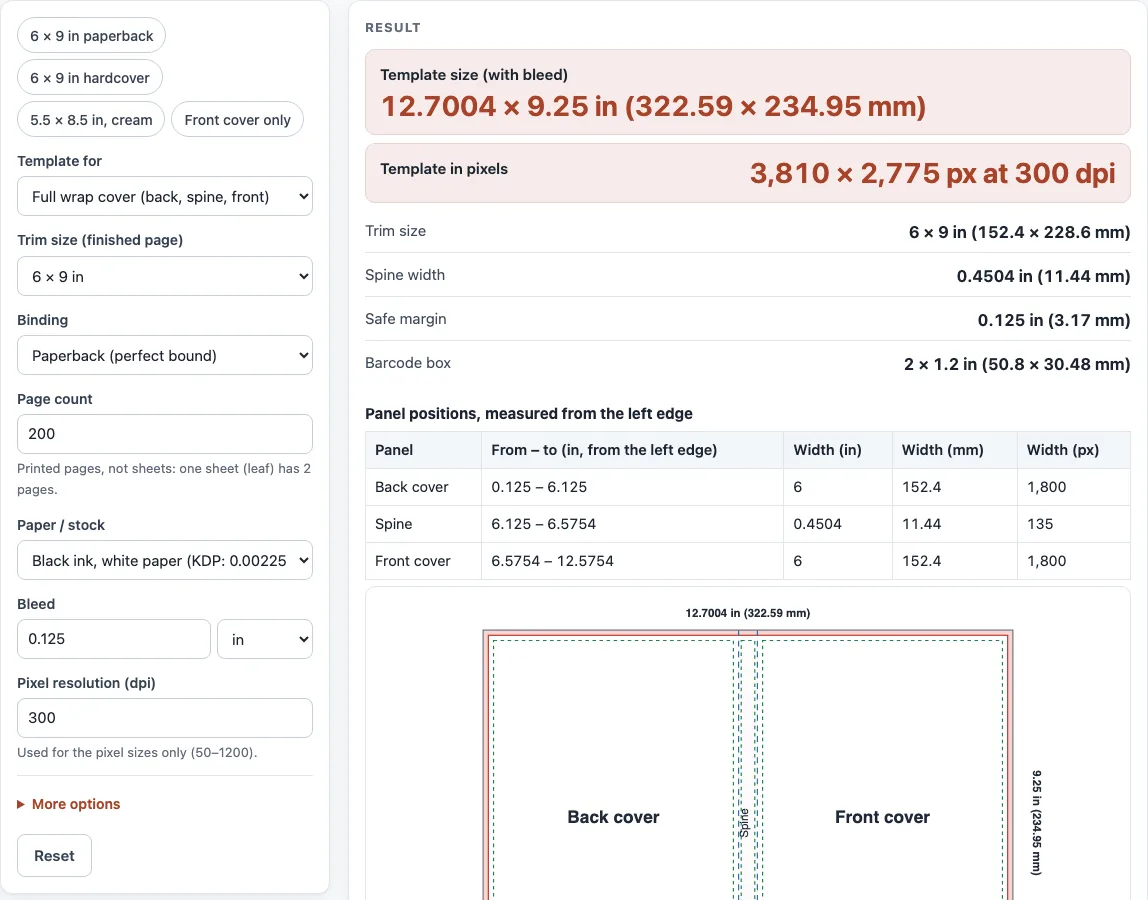
- Read Template size (with bleed) and the panel table. In the drawing, pink is bleed, the red line is the trim, blue dashed lines are spine folds, green dashed lines are safe areas and the gray box is the barcode.
- Click “Download SVG (true size)” or “Download PNG (W × H px)”. Printing is scaled to fit the paper, so use a download for the real size.
The output may be used for any purpose, including books for sale and client work, royalty-free and without attribution. The only limit is that you may not copy the website or tool as a competing service.
What does a 6x9 book cover template look like?
A 6 × 9 in book cover template is one flat sheet. Its width is bleed + back cover + spine + front cover + bleed, and its height is the trim height plus bleed at the top and bottom. Bleed is 0.125 in on each side.
For a 6 × 9 in trim with 200 pages on white paper, the spine is 0.4504 in. The width is 0.125 + 6 + 0.4504 + 6 + 0.125 = 12.7004 in, and the height is 9 + 0.25 = 9.25 in. At 300 dpi that is 3,810 × 2,775 px. A front-only 6 × 9 in template is 6.25 × 9.25 in, or 1,875 × 2,775 px.
The spine is the only part that changes with page count and paper, so choose your own page count before you check the width. Keep text at least 0.125 in inside the trim, and keep spine text at least 0.0625 in from each spine edge. IngramSpark recommends a 0.25 in text margin, so use that if you want extra room.
Where does the barcode go?
The tool draws the barcode box in the lower right of the back cover, measured in from the spine fold and up from the bottom trim; both distances are settings. With a 2 × 1.2 in box and 0.25 in distances, the box starts 3.875 in from the left edge and 7.675 in from the top edge of the template. For hardcover, KDP’s published guide asks for at least 0.76 in from the bottom edge of the cover and at least 0.25 in from the spine hinge. IngramSpark asks for a free area of at least 1.75 × 1 in with a white background. The tool shows a warning if the box leaves the safe area. Confirm final positions with your printer’s current template, because specifications change.
Sources (checked 13 October 2026): KDP Help · KDP Help (2) · IngramSpark file creation guide · Lulu Help
Worked examples
| Input | Result |
|---|---|
| 6 × 9 in, 200 pages, Paperback (perfect bound) | 12.7004 × 9.25 in (322.59 × 234.95 mm); 3,810 × 2,775 px at 300 dpi |
| 5.5 × 8.5 in, 300 pages, Paperback (perfect bound) | 12 × 8.75 in (304.8 × 222.25 mm); 3,600 × 2,625 px at 300 dpi |
| 6 × 9 in, 250 pages, Hardcover (case laminate) | 14.6925 × 10.5 in (373.19 × 266.7 mm); 4,408 × 3,150 px at 300 dpi |
| 6 × 9 in, front cover only | 6.25 × 9.25 in (158.75 × 234.95 mm); 1,875 × 2,775 px at 300 dpi |
Calculated by the tool above; open it with the same values to see each step.
Frequently asked questions
Can I use the templates for books I sell?
Yes. The output may be used for any purpose, including books for sale and client work, royalty-free and without attribution. The only limit is that you may not copy the website or tool as a competing service.
Is there a blank book cover template I can print?
Yes. Download the SVG or PNG and use it as a guide layer in your design software, or print it. Use “Print / save as PDF (scaled to fit)” if you want a printed copy.
What is a hardcover template?
A hardcover template is the wrap that covers the boards, spine and hinges. Set Binding to hardcover, and the tool draws the wrap and hinge strips. The cover width is 0.625 + board + 0.5 + spine + 0.5 + board + 0.625 in, where each board equals the trim width minus 0.185 in.
Can I make a textbook cover template or book sleeve template?
Yes, for a book you already have: measure its height, width and spine, choose a custom Trim size (finished page), and type the measured spine in Spine width override under “More options”. The template then fits that book, and you can print it as a textbook cover template or book sleeve template.
Do I need a template for an ebook cover?
Choose “Front cover only” in Template for. This gives a front cover with trim and bleed on all four sides, which works for an ebook or a printable image.
Does the tool upload my files?
No. The drawing is made in your browser, and nothing is uploaded. You do not need to sign up, and the tool is free.
Will this template match my printer exactly?
Not always. Printer specifications differ and change over time. Compare the numbers with your printer’s current template before you submit a file.
Related tools
- Book cover size calculator: Use it to work out the full cover size for your trim, page count and binding.
- Book spine width calculator: Use it when you need the spine width for a specific page count and paper.
- Dust jacket size calculator: Use it to size a removable jacket for a hardcover.
- Ebook cover size checker: Use it to check the pixel size of a digital cover.
- Standard book sizes chart: Use it to compare common trim sizes before you choose one.
- Book margins calculator: Use it to plan inside margins for the interior pages.
- DPI calculator: Use it to check the resolution of an image at a given print size.
- PDF preflight check: Use it to review a finished PDF before you send it to a printer.