A3 Size in Inches
A3 is 11.69 × 16.54 inches (297 × 420 mm). See it in every unit, in pixels at any DPI, and scaled to other sizes.
Recent
Your last 10 settings, saved only in this browser. Nothing is uploaded.
How to use the A3 size in inches tool
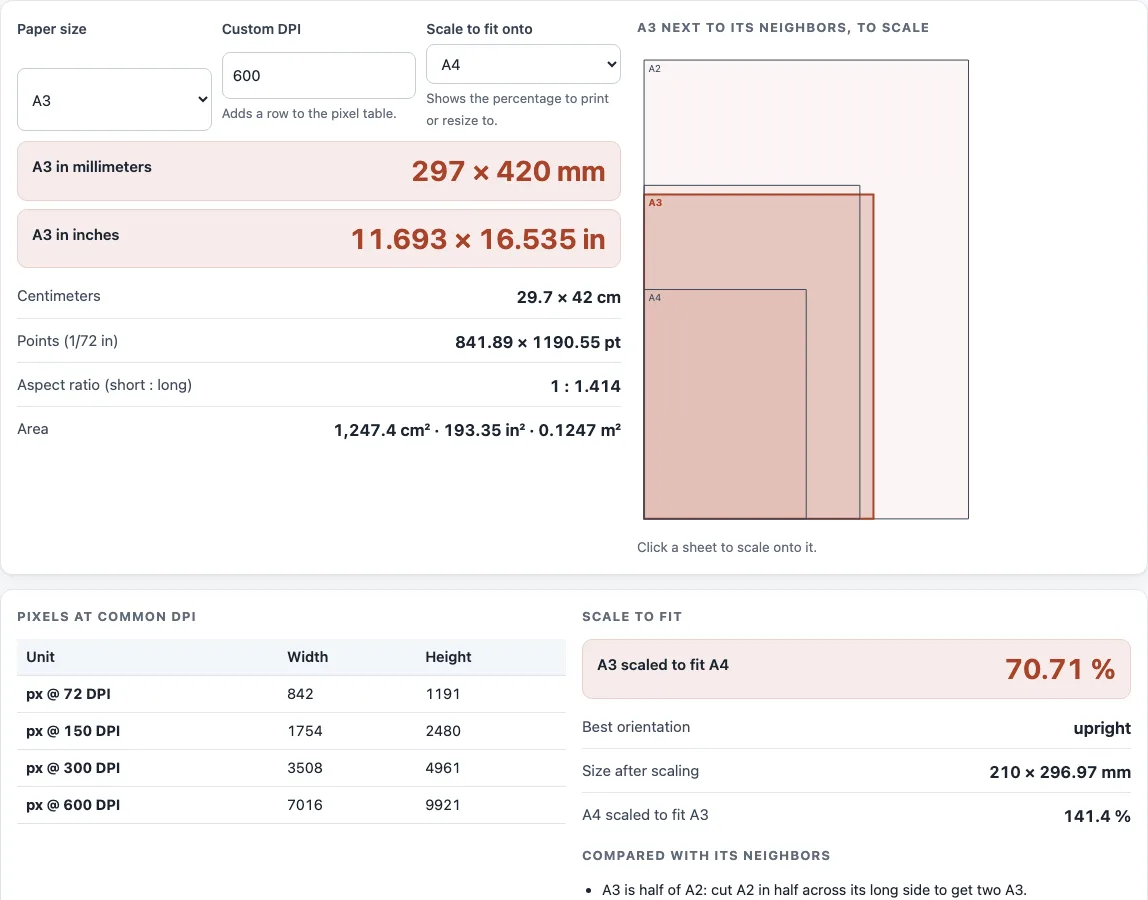
- Open the page. It starts on A3, so the “A3 in inches” row shows 11.693 × 16.535 in straight away.
- To check another size, open the “Paper size” list and choose it. All the outputs update.
- Read “A3 in millimeters” and “Centimeters” if your software or printer uses metric units.
- Set “Custom DPI” (the default is 600) to the resolution your project needs. Then check the “Pixels at common DPI” table for 72, 150, 300 and custom DPI values.
- To fit A3 onto another sheet, choose that sheet in “Scale to fit onto”. Read “A3 scaled to fit” and “Best orientation” for the percentage and the resulting size.
- You can also click a sheet in the diagram to make it the scale target.
- Read “Compared with its neighbors” to see how A3 differs from A2 and A4 in width, height and area.
When you are done, “Copy result” copies the figures, and “Copy link” creates a link that keeps your current settings. “Print / save as PDF” prints the page or saves it as a PDF, and “Reset” returns the tool to its starting state. The tool does not model printer margins or printable area, so confirm final numbers with your printer’s current template.
What is the size of A3 in inches?
A3 measures 11.693 × 16.535 inches, which rounds to about 11.7 × 16.5 inches. The size is defined in millimeters under ISO 216 as 297 × 420 mm, and the inch figure is a conversion of that definition.
How do you convert A3 from millimeters to inches?
Divide the millimeter value by 25.4, because 1 inch is exactly 25.4 mm. So 297 ÷ 25.4 = 11.693 and 420 ÷ 25.4 = 16.535. The other units follow the same logic. Centimeters are millimeters divided by 10, giving 29.7 × 42 cm. Points are inches multiplied by 72, giving 841.89 × 1190.55 pt.
How many pixels is A3 at a given DPI?
Pixels equal inches multiplied by DPI, rounded once to a whole pixel. At 300 DPI, A3 is 3508 × 4961 px. At 72 DPI it is 842 × 1191 px, and at 150 DPI it is 1754 × 2480 px. Because the rounding happens only at the end, the figures do not drift from the inch measurement.
How does A3 compare with A4 and Tabloid?
A3 has twice the area of A4. Two A4 sheets placed side by side make one A3 sheet, and A3 is half of A2. Its aspect ratio is 1 : 1.414, and its area is 1247.4 cm².
Tabloid (11 × 17 in, or 279.4 × 431.8 mm) is close to A3 but not the same. A3 is 17.6 mm wider and 11.8 mm shorter. Scaled to fit Tabloid, A3 needs 94.07 %.
How does the scale to fit percentage work?
The tool takes the smaller of the two width and height ratios, and tries both orientations, keeping the larger result. For A3 onto A4, the width ratio is 210 ÷ 297 and the height ratio is 297 ÷ 420. Both equal 0.7071, so A3 must be scaled to 70.71 %. A value of 100 % means no scaling is needed.
Sources (checked 13 October 2026): ISO · Wikipedia · Wikipedia (2) · nist.gov
Worked examples
| Input | Result |
|---|---|
| A3, custom 600 DPI, fit onto A4 | 297 × 420 mm = 11.693 × 16.535 in; 3508 × 4961 px at 300 DPI; scale to A4: 70.71 % |
| A3, custom 300 DPI, fit onto Tabloid | 297 × 420 mm = 11.693 × 16.535 in; 3508 × 4961 px at 300 DPI; scale to Tabloid: 94.07 % |
| A3, custom 150 DPI, fit onto Letter | 297 × 420 mm = 11.693 × 16.535 in; 3508 × 4961 px at 300 DPI; scale to Letter: 66.52 % |
Calculated by the tool above; open it with the same values to see each step.
Frequently asked questions
Is A3 the same as Tabloid or 11x17?
No. A3 is 297 × 420 mm, while Tabloid is 279.4 × 431.8 mm. A3 scaled to fit Tabloid needs 94.07 %.
Is A3 bigger than A4?
Yes. A3 has twice the area of A4, and its sides are longer by the same ISO 216 ratio.
What is A3 in centimeters?
A3 is 29.7 × 42 cm. Divide the millimeter values by 10 to convert.
What is the area of A3?
A3 has an area of 1247.4 cm², which is 0.12474 m² or 193.35 in². The area is width multiplied by height.
What DPI should I use for A3?
For prints looked at from close up, 300 pixels per inch is common print-shop guidance, which makes A3 3508 × 4961 px. A poster seen from across a room needs less; the print resolution calculator works out the figure for a viewing distance.
Why do my printer settings show different numbers?
Printer margins and printable area are not included in these figures. Printer specifications differ and change over time, so confirm final numbers with your printer’s current template.
Does this tool upload my files?
No. Everything runs in your browser, and nothing is uploaded.
What is the aspect ratio of A3?
A3 has an aspect ratio of 1 : 1.414. The aspect ratio is the long side divided by the short side.
Related tools
- Paper size chart: Compare A, B, C and US sizes side by side when you need several sizes at once.
- A1 paper size: Check the dimensions of A1 when your project is larger than A2.
- A2 paper size: Look up A2 to see how it relates to A3 as the next size down.
- Legal size paper: Find the dimensions of US Legal paper when you are printing for US forms.
- Booklet size and page calculator: Work out page sizes for booklets printed on sheets like A3.
- Standard book sizes chart: Compare common trim sizes when you plan a printed book.
- DPI calculator: Convert between pixel dimensions and print size at a chosen DPI.
- Print resolution calculator: Check whether an image has enough pixels for the print size you need.