A1 Paper Dimensions
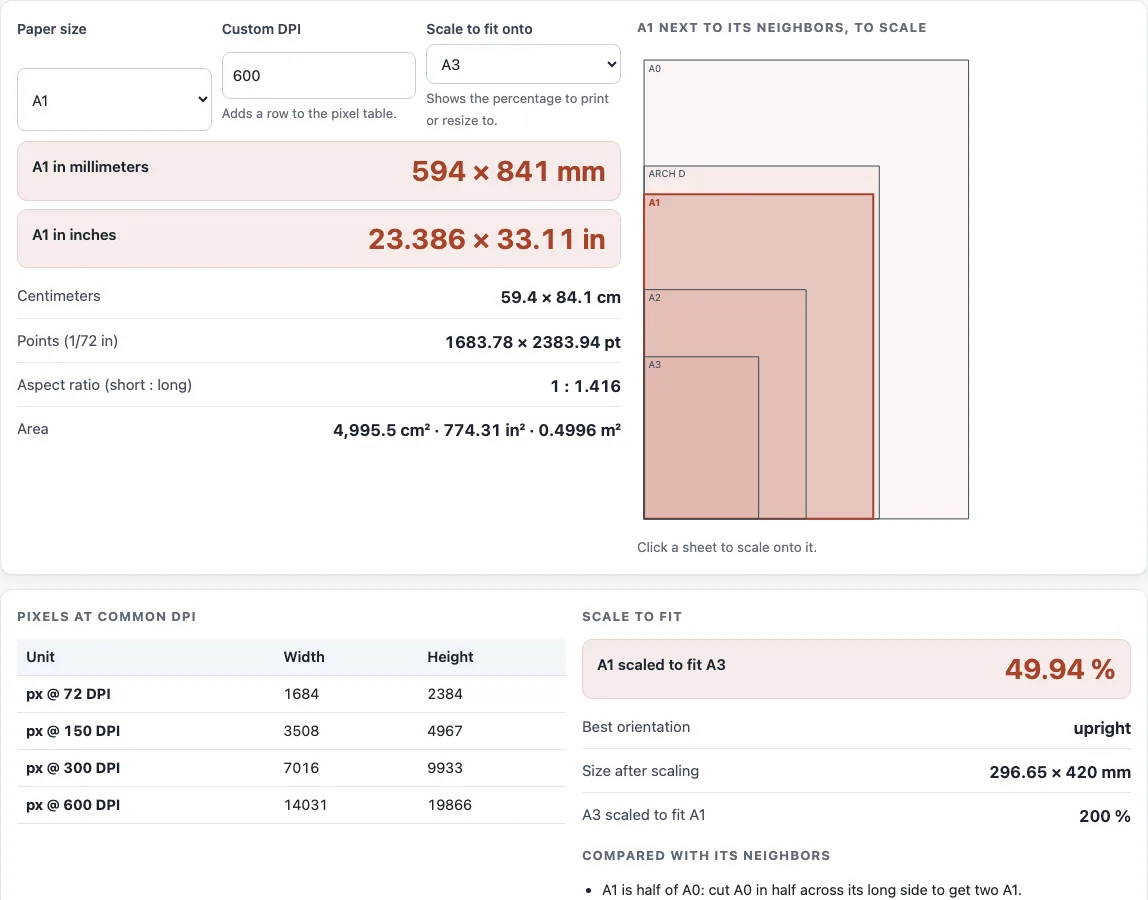
A1 is 594 × 841 mm (23.39 × 33.11 in). See it in every unit, in pixels at any DPI, and scaled to other sizes.
Recent
Your last 10 settings, saved only in this browser. Nothing is uploaded.
How to use the A1 paper size tool
The page opens on A1, so the main measurements show as soon as it loads. To check other values or scale A1 onto another size:
- Read the “A1 in millimeters” and “A1 in inches” rows. These are the main results.
- Check “Centimeters”, “Points (1/72 in)”, “Aspect ratio (short : long)” and “Area” for other units and measures.
- In “Pixels at common DPI”, read the 72, 150 and 300 DPI rows. To add your own resolution, change “Custom DPI” (default 600).
- Open “Scale to fit onto” and choose a target size. Read “A1 scaled to fit
”, “Best orientation” and “Size after scaling”. - Check “Compared with its neighbors” for the width and height differences and the area ratio. You can also click a sheet in the diagram to make it the scale target.
- Choose “Paper size” to change the size shown, or use “Reset” to return to the default.
“Copy result” copies the figures, “Copy link” saves your current settings in a link, and “Print / save as PDF” prints the page or saves it as a PDF. Nothing you enter is uploaded. Printer margins and printable area are not modelled, so check final numbers against your printer’s current template.
What are the dimensions of A1 paper?
A1 is 594 × 841 mm, which is 59.4 × 84.1 cm, or 23.386 × 33.11 in. It is one of the ISO 216 sizes, so the millimeter values are the native ones. In points, A1 is 1683.78 × 2383.94 pt.
How is A1 paper size calculated?
Each unit is derived from the millimeter values. Inches are millimeters divided by 25.4, which is an exact conversion. Centimeters are millimeters divided by 10, and points are inches multiplied by 72.
Pixels are inches multiplied by the DPI, rounded once to a whole pixel. The aspect ratio is the long side divided by the short side, which for A1 is 841 ÷ 594, about 1 : 1.416. The area is width multiplied by height.
How many A2 make an A1?
Two A2 sheets make one A1 sheet. A1 has an area of about 0.4996 m², and A2 has about 0.2495 m². A0 is defined as about 1 m², so A0 is roughly twice the area of A1.
Is A1 the same as ARCH D?
No. ARCH D is 24 × 36 in, which is 609.6 × 914.4 mm. Compared with it, A1 is 15.6 mm narrower and 73.4 mm shorter. ARCH sizes are US architectural formats with inches as the native unit.
How do you scale A1 to fit another size?
The scale is the largest value that fits A1 into the target in either orientation. The formula is the maximum, over both orientations, of the smaller of the target width divided by the A1 width and the target height divided by the A1 height. The result is shown as a percentage, where 100 % means no scaling.
For example, A1 onto A3 is 49.94 % (420 ÷ 841). A1 onto ARCH D is 102.63 % (609.6 ÷ 594): A1 fits on ARCH D without shrinking and could even be enlarged by 2.63 %.
Sources (checked 13 October 2026): ISO · Wikipedia · Wikipedia (2)
Worked examples
| Input | Result |
|---|---|
| A1, custom 600 DPI, fit onto A3 | 594 × 841 mm = 23.386 × 33.11 in; 7016 × 9933 px at 300 DPI; scale to A3: 49.94 % |
| A1, custom 150 DPI, fit onto ARCH D | 594 × 841 mm = 23.386 × 33.11 in; 7016 × 9933 px at 300 DPI; scale to ARCH D: 102.6 % |
| A1, custom 300 DPI, fit onto A4 | 594 × 841 mm = 23.386 × 33.11 in; 7016 × 9933 px at 300 DPI; scale to A4: 35.32 % |
Calculated by the tool above; open it with the same values to see each step.
Frequently asked questions
How big is A1 paper in cm?
A1 is 59.4 × 84.1 cm. The paper size chart lists every A size from A0 to A10 in centimeters, millimeters and inches.
How many pixels is A1 at 300 DPI?
A1 is 7016 × 9933 pixels at 300 DPI. At 600 DPI it is 14031 × 19866 pixels.
What is the area of A1 paper?
A1 has an area of 499,554 mm², which is 0.4996 m².
Does the tool include printer margins?
No. The tool shows the full sheet size and does not model margins or the printable area. Check your printer’s current template for the final printable size.
Is the aspect ratio of A1 exactly 1 : 1.414?
No. ISO sizes are all about 1 : 1.414, and A1 is 1 : 1.416 when calculated from its millimeter values. The small difference comes from rounding to whole millimeters.
What size is half of A1?
Half of A1 is A2, 420 × 594 mm. Folding A1 in half across its long side gives two A2 sheets, the same way every A size halves into the next.
Is my data uploaded anywhere?
No. Everything runs in your browser, and nothing is uploaded. You do not need to sign up to use the tool.
Can I compare A1 with other sizes?
Yes. The “Compared with its neighbors” section shows nearby sizes in a table, with width and height differences and area ratios. You can also click any sheet in the diagram to make it the scale target.
Related tools
- Paper size chart: use it to compare all the common sizes in one place.
- A2 paper size: use it when you need the next size down from A1.
- A3 size in inches: use it when you need A3 measurements in inches.
- Legal size paper dimensions: use it for US legal-size paper.
- Booklet size and page calculator: use it to plan page sizes for a booklet.
- Standard book sizes chart: use it to compare common trim sizes for books.
- DPI calculator: use it to work out pixel dimensions at a chosen DPI.
- Print resolution calculator: use it to check whether an image has enough resolution for a print size.