Book Cover Size Calculator
Choose the trim size, page count and paper to get the full cover size with bleed, the spine width and where each panel starts, in inches, millimeters and pixels.
Recent
Your last 10 settings, saved only in this browser. Nothing is uploaded.
Popular tools
- Business Card Size by CountryBusiness card sizes by country, with print file size and safe area
- Postcard Size and USPS LimitsPostcard sizes, USPS postcard and letter limits, and print file size
- RGB to CMYK ConverterType RGB values or a hex code, or pick a color, to get the CMYK percentages and total ink coverage.
- Standard Manuscript Format GeneratorType your name, title and word count to see a first page or novel title page laid out in standard manuscript format, ready to copy or print.
This book cover size calculator works out the full flat size of a book cover, in inches, millimeters and pixels, from your trim size, page count, paper and binding. It gives you the book cover dimensions you need in one place, so you can prepare artwork for a paperback or hardcover before you send it to a printer.
Everything runs in the browser. Nothing is uploaded, there is no sign-up, and the tool is free. The result shows the full cover with bleed, the spine width and the front cover on its own, along with a to-scale diagram of the layout of the book cover. Printer specifications differ and change, so confirm the final numbers with your printer’s current template.
How to use the book cover size calculator
- Choose a “Trim size (finished page)” from the list, such as 6 × 9 in or A5. For an unusual size, pick “Custom size” and enter “Trim width” and “Trim height” in in, mm, cm or pt.
- Type the “Page count”: printed pages, two per sheet.
- Pick the “Paper / stock”. Choose one of the listed options, or a custom option that asks for “Pages per inch (PPI)” or “Thickness”.
- Choose the “Binding”: “Paperback (perfect bound)” or “Hardcover (case laminate)”.
- Check the “Bleed” (default 0.125 in) and set the “Pixel resolution (dpi)” (default 300).
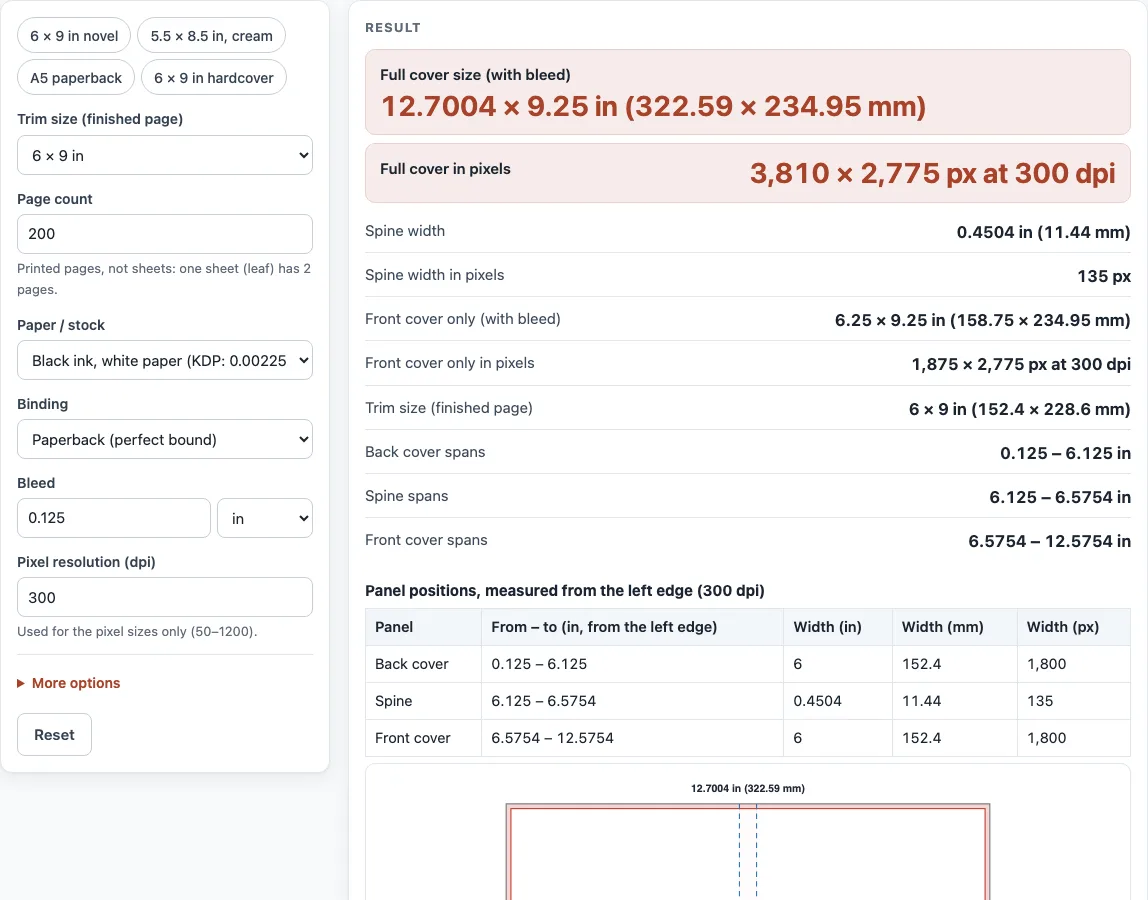
- Read the results: “Full cover size (with bleed)”, “Full cover in pixels”, “Spine width” and “Front cover only (with bleed)”. The panel table and the diagram show where each panel sits.
- Read any warnings. They appear for spine text, odd page counts, small bleed and unusual trim sizes.
The chips “6 × 9 in novel”, “5.5 × 8.5 in, cream”, “A5 paperback” and “6 × 9 in hardcover” load common setups in one click. Use “Copy result”, “Copy link” or “Print / save as PDF” to keep your numbers. Under “More options”, for hardcovers, the options “Board thickness (each of two)”, “Wrap (cover turned over the board)” and “Hinge gap (each side of the spine)” appear. Type your printer’s number in “Spine width override” if it gives one.
What size is a book cover?
A book cover is the back, spine and front printed as one flat sheet, with bleed added around the outside. Its width is the bleed, the back cover, the spine, the front cover and the bleed again. Its height is the trim height plus one bleed at the top and one at the bottom.
For a paperback, that gives width = bleed + trim width + spine + trim width + bleed, and height = trim height + 2 × bleed. Take a 6 × 9 in book with 200 pages on white paper. The spine is 200 × 0.002252 = 0.4504 in. The width is 0.125 + 6 + 0.4504 + 6 + 0.125 = 12.7004 in, and the height is 9 + 0.25 = 9.25 in. The full cover is 12.7004 × 9.25 in, which is 3,810 × 2,775 px at 300 dpi. The front cover alone, with bleed, is 6.25 × 9.25 in.
Does the spine change with page count?
Yes. The spine width is the page count multiplied by the thickness of one page. Thickness per page equals 1 ÷ PPI, so the paper you choose sets the result. White paper adds 0.002252 in per page (0.0572 mm), cream adds 0.0025 in (0.0635 mm), and premium color adds 0.002347 in (0.0596 mm).
Take a 5.5 × 8.5 in book with 300 pages on cream paper. The spine is 300 × 0.0025 = 0.75 in. The full cover is 12 × 8.75 in, or 3,600 × 2,625 px at 300 dpi. Some paper options use a printer formula instead. The Lulu formulas are pages ÷ 444 + 0.06 in for standard paper and pages ÷ 460 + 0.06 in for 460 PPI paper, so the spine gets a fixed 0.06 in added to it.
Sources (checked 13 October 2026): KDP Help · KDP Help (2) · Lulu spine width · Lulu Help · IngramSpark file creation guide
Worked examples
| Input | Result |
|---|---|
| 6 × 9 in, 200 pages, Black ink, white paper (KDP: 0.002252 in per page), Paperback (perfect bound) | Full cover 12.7004 × 9.25 in (322.59 × 234.95 mm); spine 0.4504 in (11.44 mm) |
| 5.5 × 8.5 in, 300 pages, Black ink, cream paper (KDP: 0.0025 in per page), Paperback (perfect bound) | Full cover 12 × 8.75 in (304.8 × 222.25 mm); spine 0.75 in (19.05 mm) |
| 148 × 210 mm, 320 pages, Standard paper, 444 pages per inch (Lulu: pages ÷ 444 + 0.06 in), Paperback (perfect bound) | Full cover 12.6705 × 8.5039 in (321.83 × 216 mm); spine 0.7807 in (19.83 mm) |
| 6 × 9 in, 250 pages, Hardcover spine table, 24–800 pages (Lulu), Hardcover (case laminate) | Full cover 14.6925 × 10.5 in (373.19 × 266.7 mm); spine 0.8125 in (20.64 mm) |
Calculated by the tool above; open it with the same values to see each step.
Frequently asked questions
Do I need bleed?
Yes, if your artwork touches the edge of the cover. Bleed is 0.125 in (3.2 mm) beyond the trim on the top, bottom and outside edges. Keep text at least 0.125 in inside the trim line so it is not cut off.
Book cover size in pixels?
Multiply each inch measurement by your dpi, then round. At 300 dpi, the default 6 × 9 in, 200-page cover is 3,810 × 2,775 px, and the front cover alone is 1,875 × 2,775 px. Lulu asks for 300 PPI images at minimum, and IngramSpark also asks for 300 ppi.
What is a hardcover cover size?
For “Hardcover (case laminate)”, the tool adds the wrap, a hinge gap on each side of the spine and two boards. In the 6 × 9 in, 250-page example using the Lulu table, the spine is 0.8125 in and the cover is 14.6925 × 10.5 in (373.19 × 266.7 mm). Printers publish different wrap values, so check your printer’s template and edit “Wrap” if it differs.
Why does the tool show a warning about spine text?
A thin spine cannot hold readable lettering, so printers set a minimum page count for spine text: KDP’s cover guide asks for at least 79 pages, and IngramSpark allows no spine text on perfect-bound books under 48 pages. Check your printer’s current rule before you put a title on the spine.
Can I use my printer’s spine width instead?
Yes. Type the number from your printer in “Spine width override”. The hardcover spine the tool calculates from paper and boards is an estimate, and the printer’s own template is the final word.
Is my cover artwork uploaded anywhere?
No. This calculator only needs numbers, and it runs entirely in your browser. Nothing you type is sent to a server or stored.
Related tools
- Book spine width calculator: use it when you only need the spine width for a given page count and paper.
- Book cover template generator: use it when you want a template to design the full wraparound cover in.
- Dust jacket size calculator: use it when your hardcover needs a printed jacket sized to fit over the boards.
- Ebook cover size checker: use it when you are preparing a cover for digital editions rather than print.
- Standard book sizes chart: use it when you are choosing a trim size and want to compare common options.
- Book margins calculator: use it when you are setting the inside margins of the interior pages.
- DPI calculator: use it when you need to work out the resolution of an image before you place it on the cover.
- PDF preflight check: use it when you want to check a finished PDF before you upload it to a printer.